

Security operations local networks sounds like something only a city IT department, university SOC, or managed security provider should care about. Then a shared spreadsheet is deleted, a volunteer account gets taken over, a WhatsApp group leaks private information, or a community fund transfer goes to the wrong person.
Teams think the problem is security tooling. The real problem is operational ownership.
Local networks run on trust, speed, favors, shared context, and informal coordination. That is exactly why they are fragile. The same shortcuts that help people move quickly also make it hard to know who owns an issue, who has access, what happened, and what to do next.
The practical question is not whether your local network needs enterprise-grade security. Most do not. The practical question is whether your network has a simple operating model for preventing, detecting, and responding to failures that can damage trust.
Table of contents
- Why security operations local networks is a coordination problem
- Map your local network before you defend it
- Build an incident intake system people will actually use
- Create a triage and escalation workflow
- Design controls for community tools and shared accounts
- Security operations local networks needs a response playbook
- What works and what fails in local network security
- Metrics that keep security operational
- Implementation sequence for the next 30 days
- Where d0rz.com fits in the operating model
Why security operations local networks is a coordination problem
Not a tool category
Security operations local networks is not a product category you buy. It is a way of deciding how your network handles risk when people, tools, data, money, and reputation are involved.
A neighborhood mutual aid group, a local business coalition, a civic volunteer network, and a nonprofit referral network all have security operations whether they call it that or not. Someone receives suspicious messages. Someone manages access to shared documents. Someone decides whether a strange request is legitimate. Someone communicates when things go wrong.
The mistake teams make is treating these moments as one-off exceptions. In practice, they are recurring operational events.
Why local context changes risk
Local networks have a different risk profile than large companies. The trust graph is denser. People know each other offline. Roles overlap. A volunteer may also be a donor, organizer, vendor, neighbor, and board member.
That changes the conversation. You cannot solve every problem with strict separation and anonymous ticket queues. You also cannot rely only on personal trust. Local networks need lightweight structure that respects relationships without making every decision informal.
Common local network risks include:
- Unauthorized access to shared calendars, documents, drives, or mailing lists.
- Impersonation of organizers, donors, partners, or service providers.
- Misrouted payments, reimbursements, grants, or aid requests.
- Exposure of private member, beneficiary, or volunteer information.
- Disputes over who approved a decision or changed a record.
- Social engineering through trusted community channels.
The operating model test
A useful way to think about it is this: if something sensitive goes wrong at 7:30 p.m. on a Thursday, does your network know what happens next?
Not in theory. In practice.
Who receives the report? Who confirms it? Who can lock access? Who tells affected people? Who documents the decision? Who decides the issue is closed?
Practical rule: If the answer depends on remembering which person usually handles it, you do not have security operations. You have institutional memory trapped in one person.
The goal is not bureaucracy. The goal is reducing confusion at the exact moment confusion becomes expensive.
Map your local network before you defend it
Assets are relationships
Most security checklists start with systems: email, database, website, payment processor, CRM. That matters, but local networks should start one level earlier.
Your most important assets are usually relationships and permissions. Who can message the whole network? Who can approve funds? Who can invite new members? Who can view sensitive needs? Who can change public information? Who can represent the group externally?
If you only inventory tools, you miss the real blast radius. A compromised community admin account is not just an account problem. It may be a trust problem, a safety problem, a funding problem, and a reputation problem.
Trust boundaries show up at handoffs
Local networks often break at handoffs: volunteer to staff, organizer to partner, partner to vendor, donor to recipient, online channel to offline action.
The security question is simple: what must be true before this handoff is trusted?
Examples:
- A new volunteer requests access to a beneficiary list.
- A partner asks to export event attendee data.
- A community member asks for emergency funds through a direct message.
- A local organizer posts a last-minute venue change.
- A former volunteer still has access to a shared drive.
Each handoff needs a minimum verification step. Not a complicated process. Just enough friction to prevent obvious abuse.
Access should follow roles
Access should be attached to roles, not personalities. This is hard in community settings because the most reliable people tend to collect permissions over time.
The problem is that trusted people eventually change roles, burn out, move away, or leave. When access follows personalities, offboarding becomes archaeological work.
A simple role map can look like this:
| Role | Typical access | Approval needed | Review frequency |
|---|---|---|---|
| Event volunteer | Event roster, check-in sheet | Event lead | After event |
| Program coordinator | Member records, partner notes | Operations lead | Monthly |
| Finance helper | Expense folder, reimbursement form | Treasurer | Monthly |
| Communications lead | Email list, social channels | Director or board lead | Quarterly |
| Network admin | Account settings, integrations | Two accountable leads | Quarterly |
This table does not need to be perfect. It needs to exist.
Build an incident intake system people will actually use
Make reporting low friction
A reporting system that people avoid is worse than no reporting system because it creates false confidence. For local networks, the best intake path is usually boring and obvious.
Use one primary channel for security and trust issues. It might be a dedicated email address, a form, a private coordinator channel, or a help desk queue. The format matters less than consistency.
The intake path should collect only what is needed:
- What happened?
- When did it happen?
- Who or what is affected?
- Is there a screenshot, link, message, or file?
- Is there immediate risk to people, funds, access, or reputation?
- How can the reporter be contacted safely?
The team at threatcrush.com often frames this as a signal problem: security operations improves when weak signals are captured early, routed correctly, and connected to ownership before they become noisy emergencies.
Separate urgent from important
Not every report is an incident. Some are concerns, mistakes, requests, conflicts, or policy questions. Treating everything as an emergency burns out organizers. Treating everything as casual creates avoidable damage.
Use three simple intake categories:
- Immediate risk: active account takeover, payment fraud, exposed sensitive data, threat to physical safety, public impersonation.
- Needs review: suspicious message, access concern, mistaken sharing, unusual request, partner data question.
- Operational request: password reset, access change, tool question, documentation issue.
Practical rule: The first decision is not the final diagnosis. The first decision is routing.
A good intake process makes it acceptable to report uncertainty. People should not have to prove something is bad before they tell someone.
Protect the reporter
Local communities are relationship-heavy. Reporting a concern can feel socially risky, especially if the concern involves a respected organizer, donor, partner, or friend.
If people think reporting will create drama, they will route around the system. They will whisper, delay, or stay silent.
Your intake process should say three things plainly:
- Reports are handled on a need-to-know basis.
- Good-faith reporting is protected even if the concern turns out to be harmless.
- Retaliation or social pressure around reporting is not acceptable.
This is not legal theater. It is operational design. The reporting system only works if people trust it more than they trust back-channel gossip.
Create a triage and escalation workflow
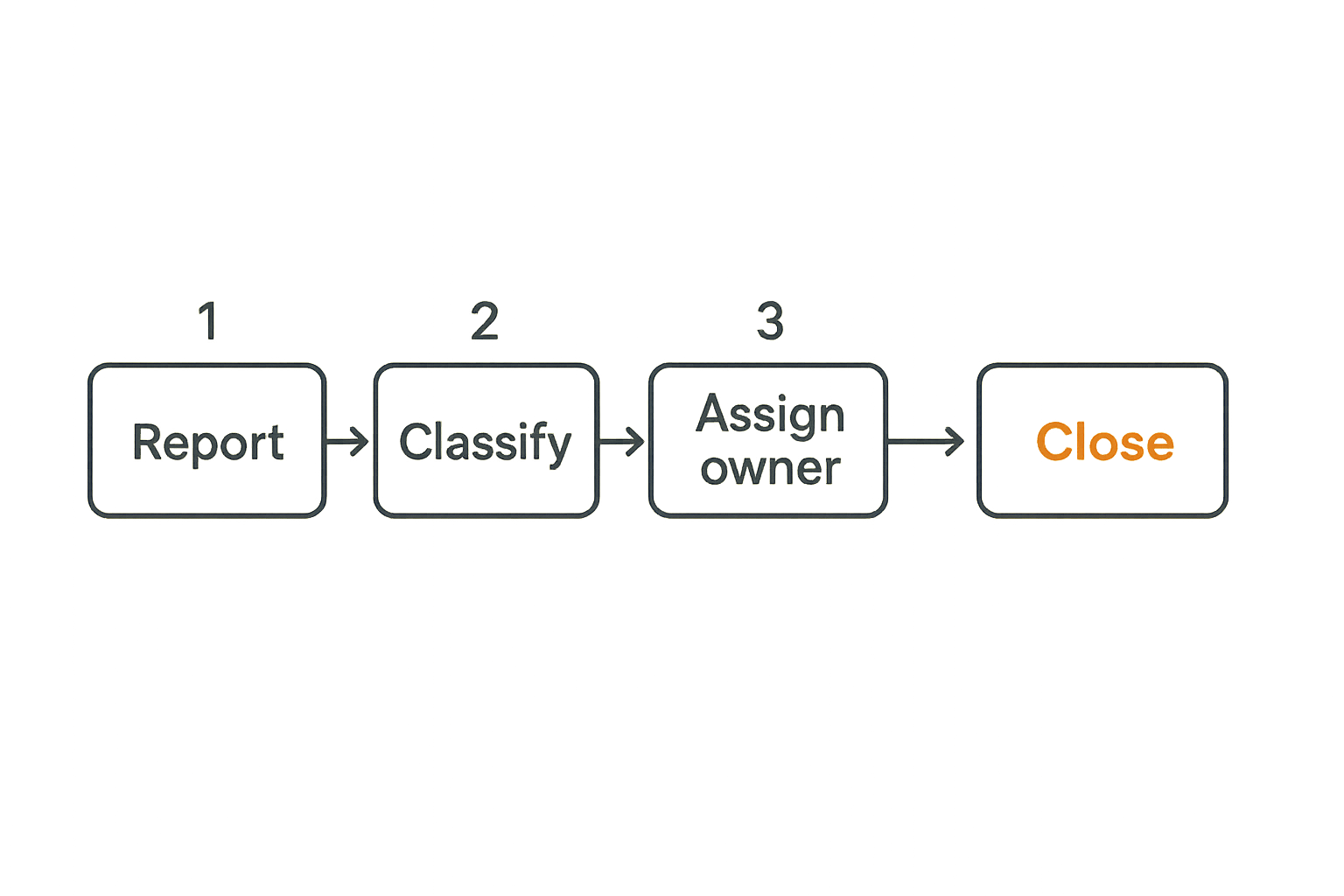
Classify the event
Triage is where many local networks either overreact or underreact. The practical question is: what decision must be made in the next hour, day, or week?
Use a small severity model:
- Severity 1: active harm or high likelihood of harm. Lock access, preserve evidence, notify accountable leads.
- Severity 2: credible concern with limited current impact. Investigate, verify, contain if needed.
- Severity 3: low-risk issue or process gap. Document, fix, and track recurrence.
Do not build a ten-level severity matrix unless you have people trained to use it. Most community networks need a shared language, not a miniature enterprise SOC.
Assign ownership fast
What breaks in practice is not classification. It is ownership.
Someone notices the problem. Someone else says they will look into it. A third person has the credentials. A fourth person knows the partner. Two days later, nobody is sure whether it was fixed.
Every triaged issue needs one owner, one backup, and one next update time.
A good issue record can be simple:
- Owner: person accountable for driving resolution.
- Backup: person who can act if the owner is unavailable.
- Current status: new, investigating, contained, resolved, closed.
- Next update: time or date when status will be reviewed.
- Decision log: what was done and why.
Practical rule: If an issue has no owner and no next update time, it is not being handled. It is being hoped away.
Escalate without drama
Escalation should not mean panic. It should mean the issue now requires a different authority, skill, or communication path.
Escalate when:
- Money, identity, legal exposure, physical safety, or sensitive data is involved.
- A public statement may be needed.
- Access must be removed from a powerful or well-connected person.
- A partner or funder is affected.
- The issue may repeat across the network.
Predefine who can escalate and who receives escalations. In a local network, this may be an operations lead, board chair, fiscal sponsor, data protection lead, or small incident group.
Escalation is easier when it is treated as normal workflow, not personal accusation.
Design controls for community tools and shared accounts
Minimum viable identity
Most local networks use a stack of practical tools: email groups, shared drives, messaging apps, forms, spreadsheets, event platforms, donation tools, and social media accounts. The risk is not that these tools exist. The risk is that identity and access are unmanaged across them.
Minimum viable identity means:
- Each person uses their own account where possible.
- Shared accounts are rare, documented, and protected.
- Two-factor authentication is enabled for admin and finance roles.
- Recovery emails and phone numbers belong to the organization, not one volunteer.
- Admin access is limited to people who actually administer.
This is not advanced security. It is hygiene. It prevents the most common failure modes from becoming full incidents.
Shared inboxes and documents
Shared inboxes and documents are often the operational center of a local network. They are also where sensitive information accumulates.
Set rules for three things:
- Who can access the shared space.
- What information belongs there.
- How long information stays there.
For example, a volunteer coordination folder may not need identification documents, private case notes, or payment details. If those files appear, the issue is not only a privacy problem. It is an information architecture problem.
The mistake teams make is securing the tool without redesigning the workflow that keeps putting sensitive data in the wrong place.
Offboarding is a control
Offboarding is where local networks reveal whether access was designed or improvised.
A person leaving should trigger a standard checklist:
- Remove tool access.
- Transfer document ownership.
- Rotate shared credentials if any existed.
- Update public contact points.
- Reassign open issues and commitments.
- Confirm whether they retain any advisory or alumni role.
Do this for volunteers, staff, board members, vendors, and partner contacts. The tone can be respectful and human. The control still needs to happen.
Security operations local networks needs a response playbook
The five playbooks most groups need
Security operations local networks becomes much easier when the common scenarios already have playbooks. The playbook does not need to be long. It needs to remove guesswork.
Most local networks should start with five:
- Account takeover: what to lock, who to notify, how to recover access.
- Sensitive data exposure: how to contain, assess, notify, and prevent recurrence.
- Payment or reimbursement fraud: how to pause transfers, verify requests, and preserve records.
- Impersonation or misinformation: how to confirm identity, correct channels, and communicate clearly.
- Member safety concern: how to escalate, limit exposure, and coordinate with appropriate local resources.
A playbook is not a script for every edge case. It is a set of defaults.
What to decide before the incident
The worst time to decide communication authority is during an incident. Decide in advance:
- Who can pause a payment workflow?
- Who can remove admin access?
- Who can send a network-wide correction?
- Who can contact affected partners?
- Who can speak publicly?
- Who keeps the incident record?
These decisions are uncomfortable because they expose power structures. That is the point. Security operations forces hidden authority into the open.
Practical rule: Response authority should be explicit before it is needed, because implicit authority becomes conflict during incidents.
How to practice without theater
Many teams hear practice and imagine tabletop exercises with consultants, slides, and artificial tension. Local networks do not need that.
Run a 30-minute scenario once a quarter:
- A volunteer reports that a shared folder link was posted publicly.
- A donor receives a suspicious payment request from someone pretending to be your treasurer.
- An event coordinator leaves suddenly and still owns the event registration account.
- A member reports that private information was shared in a group chat.
Ask: who owns it, what is the first action, what access is needed, who gets updated, and where is it documented?
The value is not performance. The value is finding the missing step before reality finds it for you.
What works and what fails in local network security
What works in practice
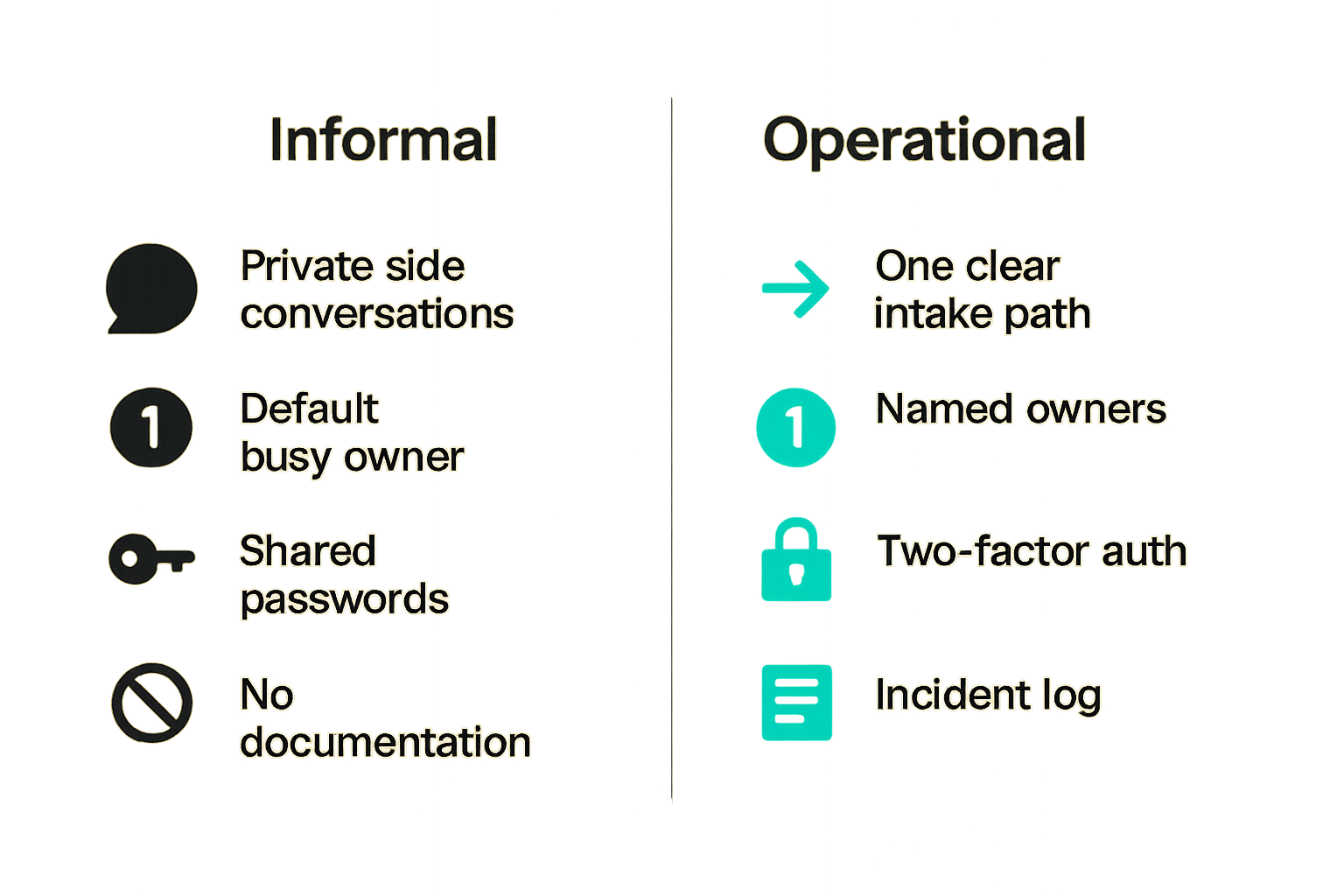
What works is usually smaller than teams expect:
- One clear intake path.
- A short severity model.
- Named owners for sensitive systems.
- Role-based access rather than personality-based access.
- Basic two-factor authentication for critical accounts.
- A monthly access review for high-risk tools.
- A simple incident log.
- Playbooks for common scenarios.
This is enough to change behavior. It gives organizers a shared operating language. It makes risk visible without requiring everyone to become a security specialist.
The best systems are boring, repeatable, and socially acceptable. If the system makes people feel foolish for using it, it will fail.
What fails in practice
What fails is also predictable:
- Long policies nobody reads.
- Security responsibilities assigned to the busiest founder or organizer by default.
- Shared passwords passed through chat.
- Admin access granted because someone is trusted, not because they need it.
- Incident reports handled through private side conversations.
- No decision log.
- No offboarding.
- Public communication improvised under pressure.
The common pattern is not laziness. It is unclear architecture. People fill gaps with relationships because the system gives them nothing else to use.
The comparison that matters
| Area | Informal network behavior | Operational security behavior |
|---|---|---|
| Reporting | Message whoever seems responsible | Use one known intake path |
| Access | Trusted people accumulate permissions | Roles define permissions |
| Triage | Discuss until someone acts | Classify, assign owner, set next update |
| Escalation | Happens when pressure builds | Happens when predefined conditions are met |
| Documentation | Stored in chats and memory | Logged with decisions and actions |
| Offboarding | Done if someone remembers | Triggered by role change |
| Communication | Improvised | Assigned and approved |
This is the real shift. Security is not added on top of the community. It is built into how the community coordinates.
Metrics that keep security operational
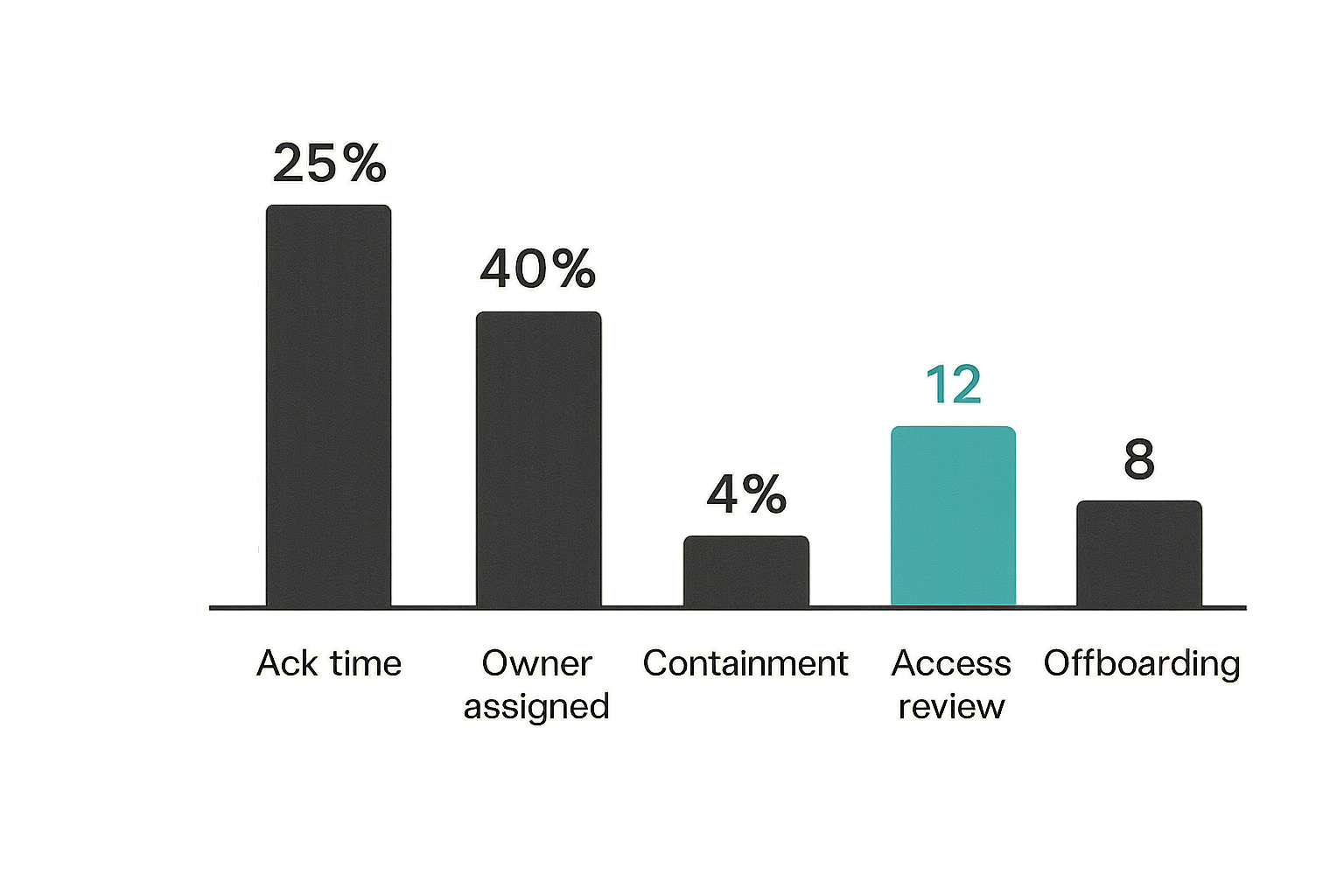
Measure time and ownership
Metrics are useful only if they change decisions. For local networks, start with operational measures rather than technical dashboards.
Track:
- Time from report to acknowledgement.
- Time from acknowledgement to owner assigned.
- Time from owner assigned to containment.
- Number of open issues without next update.
- Number of high-risk accounts reviewed this month.
- Number of offboarding actions completed on time.
These measures show whether the system is functioning. They also reveal bottlenecks. If every issue waits for one person, your problem is not awareness. Your problem is dependency.
Track repeat causes
Many security issues are symptoms of the same underlying workflow flaw.
For example:
- Repeated mistaken sharing may mean folders are structured badly.
- Repeated suspicious payment requests may mean approval workflows are too informal.
- Repeated access confusion may mean roles are unclear.
- Repeated public corrections may mean communication authority is fragmented.
The practical question is not how many incidents happened. It is which patterns keep producing them.
A monthly review should ask:
- What repeated this month?
- Which control would have prevented or reduced it?
- Who owns that control?
- When will we know it is working?
Avoid vanity dashboards
A dashboard with green boxes can make a fragile network look mature. Be skeptical.
Avoid metrics like total reports, total members trained, or number of policies published unless they connect to action. A policy nobody uses is not operational maturity. A training session that does not change access, intake, or escalation is not a control.
Better questions:
- Can people report concerns without searching?
- Are high-risk accounts reviewed regularly?
- Are incidents closed with causes and actions?
- Are access changes tied to role changes?
- Can the network communicate clearly during a trust event?
Metrics should pressure the workflow, not decorate it.
Implementation sequence for the next 30 days
Week one inventory and ownership
Start with what exists. Do not begin by writing a policy.
- List the tools your network uses for communication, records, money, events, and public presence.
- Identify the owner of each tool.
- Identify who has admin access.
- Mark which tools contain sensitive information or control public trust.
- Assign one accountable lead for security operations coordination.
The output should be a living inventory. It can start as a spreadsheet. The important part is not the format. The important part is that the network stops guessing.
Week two intake and triage
Build the front door.
- Choose one reporting channel.
- Publish it to organizers, volunteers, and partners.
- Define the three intake categories: immediate risk, needs review, operational request.
- Create a small issue log with owner, backup, status, next update, and decision notes.
- Decide who monitors the channel and when.
Do not over-automate this too early. The first goal is reliability. Once the pattern is stable, you can improve routing, reminders, and integrations.
Week three controls and rehearsals
Put controls around the highest-risk workflows first.
- Enable two-factor authentication for admin, finance, and public communication accounts.
- Remove unnecessary admin access.
- Create an offboarding checklist.
- Write the five basic playbooks.
- Run one 30-minute scenario.
- Review what failed and assign fixes.
By the end of 30 days, your network should be able to answer the core operating questions: what matters, who owns it, how issues arrive, how they are triaged, how access changes, and how response is documented.
That is a real security operations foundation for local networks.
Where d0rz.com fits in the operating model
Coordination systems need memory
Local networks do not fail only because people are careless. They fail because coordination lives in scattered messages, private memory, and temporary urgency.
A good local network system should preserve context: who asked for what, who offered help, what commitments were made, what changed, and which relationships are active. That context is not just useful for community building. It is useful for trust and security operations.
When the network has memory, unusual requests are easier to spot. Ownership is easier to assign. Sensitive handoffs are easier to review. New organizers can understand how decisions happened without interrogating the same three people.
Use asks and offers as signal
Asks and offers are not only community engagement artifacts. They are operational signals.
A sudden change in asks may reveal a local stress event. A new offer involving money, data, transport, housing, or vulnerable people may need additional verification. A repeated mismatch between asks and available help may show where informal workarounds are forming.
This does not mean turning community coordination into surveillance. It means designing the network so trust-sensitive activity has enough structure to be handled responsibly.
The closing point is simple: security operations local networks is not about making communities colder. It is about giving trust a workflow strong enough to survive growth, turnover, incidents, and real-world pressure.
Try d0rz.com
Build and sustain real local networks with better coordination around asks, offers, roles, and trust. Try d0rz.com.