

Threat intelligence asks and offers sound like a security operations topic until you watch a local network try to respond to a real incident.
A nonprofit gets phished. A local clinic sees suspicious login attempts. A city partner hears about a vendor compromise. Everyone wants to help, but the help shows up as scattered messages, forwarded screenshots, half-remembered contacts, and offers like “let me know if you need anything.”
Teams think the problem is lack of information. The real problem is exchange architecture.
If a network cannot turn “we need to know whether this is affecting anyone else” into a specific ask, and cannot turn “we can help” into a reliable offer, intelligence does not move. It pools in private chats, expires before it is useful, or creates more work for the people already under pressure. The practical question is not “do we have threat intelligence?” It is “can our community route need to capacity quickly, safely, and with enough context to act?”
This is where threat intelligence asks and offers become useful beyond the SOC. They give community organizers, local network builders, nonprofit leaders, and civic entrepreneurs a pattern for coordinating scarce expertise under time pressure.
Table of contents
- Why threat intelligence asks and offers are a coordination system
- The operating model behind threat intelligence asks and offers
- Design the ask so it can be acted on
- Design the offer so it can be trusted
- Build the workflow from intake to resolution
- What breaks in practice
- Governance for shared threat intelligence asks and offers
- Metrics that show the network is working
- Tooling and data model for the exchange
- Product fit: from lists to a living exchange
Why threat intelligence asks and offers are a coordination system
The ask is the unit of need
An ask is not a complaint, a worry, or a forwarded alert. It is a structured statement of what someone needs from the network.
In security work, that might be: “Can anyone confirm whether this domain has been seen in phishing against local nonprofits this week?” In a civic network, the equivalent might be: “Can any partner validate whether this vendor outage is affecting client services before noon?”
The mistake teams make is treating asks as casual posts. Casual posts depend on whoever happens to read them, understand them, and feel responsible enough to respond. Structured asks can be triaged, matched, escalated, and closed.
A useful ask includes:
- the situation;
- the specific question;
- the urgency;
- the kind of help needed;
- the sensitivity level;
- the decision the answer will support.
Practical rule: If an ask cannot be routed to a person or group, it is not yet an ask. It is still a signal that needs shaping.
That changes the conversation. Instead of asking, “who knows something about this?” the network asks, “what decision is blocked, and who has the smallest useful piece of context?”
The offer is the unit of capacity
An offer is not goodwill. Goodwill matters, but goodwill without boundaries creates ambiguity. An offer is a clear statement of capability the network can use.
Examples:
- “We can review suspicious email headers for community organizations on weekdays within four hours.”
- “We can provide one incident communications template for small nonprofits.”
- “We can compare indicators against our local telemetry, but cannot share raw logs.”
- “We can join a 30-minute triage call for confirmed ransomware cases.”
The practical question is not whether people want to help. Most people in strong local networks do. The question is whether their help is described in a way that can be matched without a long negotiation.
Why this matters for local networks in 2026
Local networks are becoming operational infrastructure. They coordinate food access, mutual aid, neighborhood resilience, workforce support, small business recovery, digital inclusion, and nonprofit capacity. They also inherit the risks that come with being connected.
A phishing campaign against one community organization may affect others. A compromised vendor may touch multiple agencies. A rumor about a breach may create panic before facts are available. A local partner may need help interpreting a warning from an insurer, bank, school district, or managed service provider.
Threat intelligence asks and offers give the network a way to move from rumor to coordinated response without pretending every organization has a mature security team.
The operating model behind threat intelligence asks and offers
Separate signal from coordination
Signals are raw observations: a suspicious email, a domain, an IP address, a login alert, a vendor notice, a strange invoice, a staff report, a screenshot, a phone call from a peer.
Coordination is the work of deciding what to do with those signals: verify, enrich, route, respond, notify, archive, or ignore.
What breaks in practice is that networks mix these together. A shared chat becomes the place for everything: alerts, speculation, help requests, jokes, vendor complaints, and incident updates. People stop reading closely. Sensitive details leak into the wrong thread. The loudest issue wins.
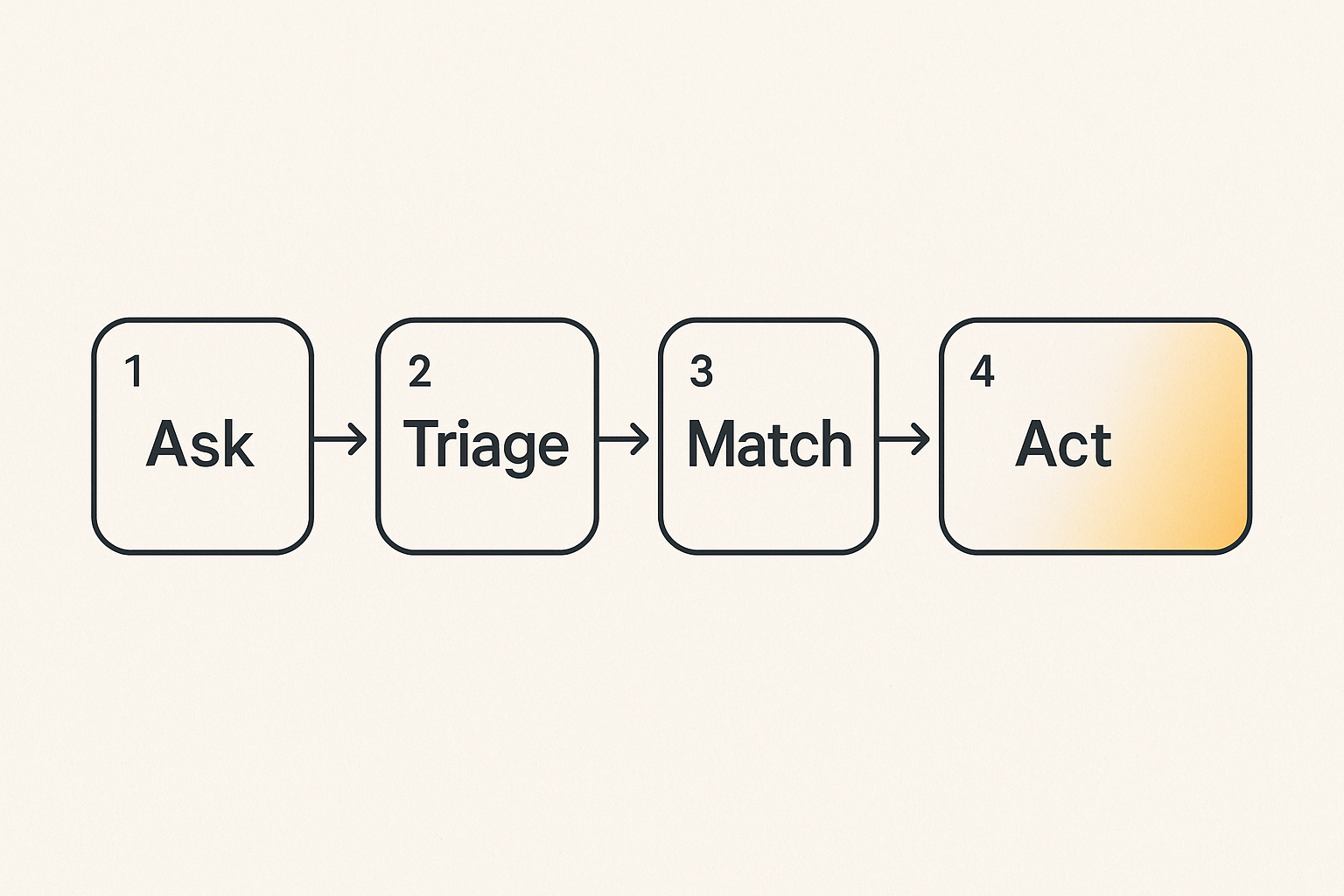
Threat intelligence asks and offers require a small operating model:
| Layer | Purpose | Bad pattern | Better pattern |
|---|---|---|---|
| Signal | Capture what was observed | Forward everything into chat | Intake with minimal required fields |
| Ask | Convert uncertainty into a request | “Anyone seen this?” | “Can someone validate this domain by 3 p.m.?” |
| Offer | Make capacity discoverable | “Happy to help” | “Can review email headers, 2 per week” |
| Match | Connect need to capacity | Whoever replies first | Triage owner assigns or suggests matches |
| Output | Return usable information | Long thread with no summary | Decision note, next action, owner |
| Memory | Improve future response | Lost in DMs | Searchable closed-loop record |
This guest perspective comes from the team at threatcrush.com, where the same pattern shows up inside SOCs: intelligence is only valuable when it changes investigation, prioritization, or response.
Assign roles before the incident
A local network does not need a heavy command structure. It does need named roles.
At minimum:
- Requester: the person or organization submitting the ask.
- Triage owner: the person who clarifies, classifies, and routes the ask.
- Responder: the person or group accepting the match.
- Steward: the person responsible for hygiene, permissions, and retrospectives.
- Observer: trusted participants who can see patterns but may not act on every item.
These roles can rotate. In small networks, one person may hold more than one role. The point is to avoid the silent assumption that “the community” will handle it.
Practical rule: A network without a triage owner turns every urgent ask into a popularity contest.
Track state, not just messages
Messages are conversation. State is operational truth.
An ask should have a status:
- new;
- needs clarification;
- ready to match;
- matched;
- in progress;
- answered;
- closed;
- archived.
An offer should have a status too:
- active;
- paused;
- expired;
- unavailable;
- needs verification;
- retired.
This looks simple, but it changes behavior. Participants stop asking “did anyone handle this?” because the workflow shows whether the ask has an owner. Leaders stop assuming capacity exists because offers show whether they are still active.
Design the ask so it can be acted on
Make the request specific enough to route
A weak ask creates work for everyone downstream. A strong ask narrows the problem.
Weak ask:
“We’re seeing weird emails. Has anyone else seen this?”
Better ask:
“A staff member at a local housing nonprofit received an email claiming to be from our payroll vendor. Can someone help determine whether the sender domain is spoofed or newly registered? We need a recommendation before sending a staff-wide warning today.”
The second version gives the network enough to route the ask. It suggests the needed skill: email analysis, domain review, or phishing triage. It gives urgency. It names the decision.
A practical ask template:
- What happened? One or two factual sentences.
- What do you need? Validation, analysis, contact, template, escalation, comparison, or advice.
- What decision depends on it? Block, notify, report, wait, escalate, reassure.
- By when? Time and date.
- Sensitivity level? Public, network-only, restricted, confidential.
- What can be shared? Indicators, screenshots, logs, vendor names, anonymized summary.
Include context without oversharing
Security incidents create a tension: people need enough context to help, but oversharing can harm the organization, expose clients, or spread unverified claims.
The mistake teams make is swinging to one extreme. They either share almost nothing, making help impossible, or share everything, creating privacy and reputational risk.
Use minimum useful context:
- Share indicators when possible instead of personal details.
- Redact names, client data, email addresses, and internal system names unless required.
- Separate confirmed facts from assumptions.
- Label screenshots and attachments by sensitivity.
- Use a private route for restricted artifacts.
A useful way to think about it is “progressive disclosure.” Start with enough information to match the ask. Share deeper details only with the responder who accepts the work and has the right trust level.
State the deadline and decision
Urgency is often implied badly. “ASAP” is not a deadline. “Important” is not a decision.
Good asks connect time to action:
- “Need answer by 11 a.m. before sending staff guidance.”
- “Need confirmation today before contacting affected clients.”
- “Need a second opinion this week before renewing the vendor contract.”
- “Need no immediate action, but want to know if others are seeing the same pattern.”
This prevents overreaction. Not every threat intelligence ask is an emergency. Some are pattern-building. Some are preparedness. Some are low-priority but valuable if aggregated.
Design the offer so it can be trusted
Define the scope of help
Offers fail when they are too broad. “We can help with cybersecurity” is not matchable. “We can review suspicious login alerts from Microsoft 365 for small nonprofits” is matchable.
Good offers define:
- capability;
- audience served;
- response time;
- capacity limit;
- exclusions;
- required inputs;
- confidentiality conditions.
Example offer:
“Our volunteer security group can review up to three suspicious email submissions per week from local nonprofits. We need full headers and a screenshot. We will return a plain-language recommendation within one business day. We cannot provide legal advice or full incident response.”
This is not bureaucratic. It is respectful. It protects the responder from unlimited demand and protects the requester from assuming more help than exists.
Make capacity visible but bounded
Local networks often rely on a few capable people. Those people become invisible infrastructure. Eventually they burn out or stop responding.
Bounded offers prevent that pattern.
Instead of:
- “Call Sam for anything technical.”
Use:
- “Sam can take one 30-minute triage call per week for confirmed incidents.”
- “The university team can analyze suspicious domains on Tuesdays and Thursdays.”
- “The chamber contact can reach three local banks for fraud escalation, but only during business hours.”
Practical rule: An offer without a boundary is not generosity. It is an unpriced dependency.
Boundaries also make it easier for more people to participate. A person may not be able to “own cybersecurity,” but they may be able to offer one specific thing: a checklist, a translation, a vendor contact, a room for a tabletop exercise, or a trusted introduction.
Give every offer a shelf life
Offers decay. People change jobs. Volunteers get busy. Tools change. A contact at a vendor leaves. A response commitment that was true in March may be false in October.
Every offer should have an expiration or review date.
Useful fields:
- active until;
- review owner;
- last confirmed;
- capacity remaining;
- pause reason;
- replacement contact.
This matters in threat intelligence because stale capacity is dangerous. During an incident, a dead offer looks real until someone tries to use it. That delay costs trust.
Build the workflow from intake to resolution
A seven-step implementation sequence
Do not start by buying tools or creating a giant directory. Start with the workflow.
- Define the exchange boundary. Decide who the network serves: nonprofits, neighborhood groups, small businesses, clinics, schools, civic partners, or a narrower subset.
- Create the ask template. Keep it short enough that people will use it under stress.
- Create the offer template. Force scope, limits, response time, and review date.
- Name triage owners. Start with two or three people, not a committee.
- Choose sensitivity levels. Public, network-only, restricted, confidential is usually enough.
- Run three test scenarios. Phishing, vendor outage, account compromise. Watch where the workflow stalls.
- Review and revise monthly. Remove dead offers, refine categories, and document what was learned.
The workflow should be boring. Boring is good. Boring means people know what to do before adrenaline takes over.
Triage before matching
Matching too early creates noise. Someone posts a vague ask, five people respond with partial advice, and the requester now has to coordinate the helpers while dealing with the original problem.
Triage should answer:
- Is this actually a threat intelligence ask?
- Is it urgent, important, both, or neither?
- What category is it in?
- What information is missing?
- What sensitivity level applies?
- Which offers might match?
- Is the network the right place to handle it?
Some asks should be redirected. A confirmed crime may need law enforcement or legal counsel. A breached system may need an incident response provider. A rumor may need verification before broad sharing. A request for free labor may need to be reframed or declined.
Close the loop with usable output
The output of a threat intelligence ask should not be “thanks everyone.” It should be a short decision record.
A good closeout includes:
- what was asked;
- who responded;
- what was concluded;
- what action was taken;
- what should be watched next;
- what can be shared with the broader network;
- whether any offer needs updating.
This is how a local network builds memory. The next organization facing a similar issue should not have to rediscover the same answer from scratch.
What breaks in practice
Vague asks create social debt
Vague asks feel harmless, but they transfer work to the network.
“Any cybersecurity people here?” requires others to ask follow-up questions. “Does anyone know about ransomware?” invites speculation. “Can someone jump on a call?” hides the scope of the problem.
The result is social debt. People want to be helpful, so they engage, but they spend energy clarifying rather than solving. Over time, skilled participants stop responding unless they already know the requester.
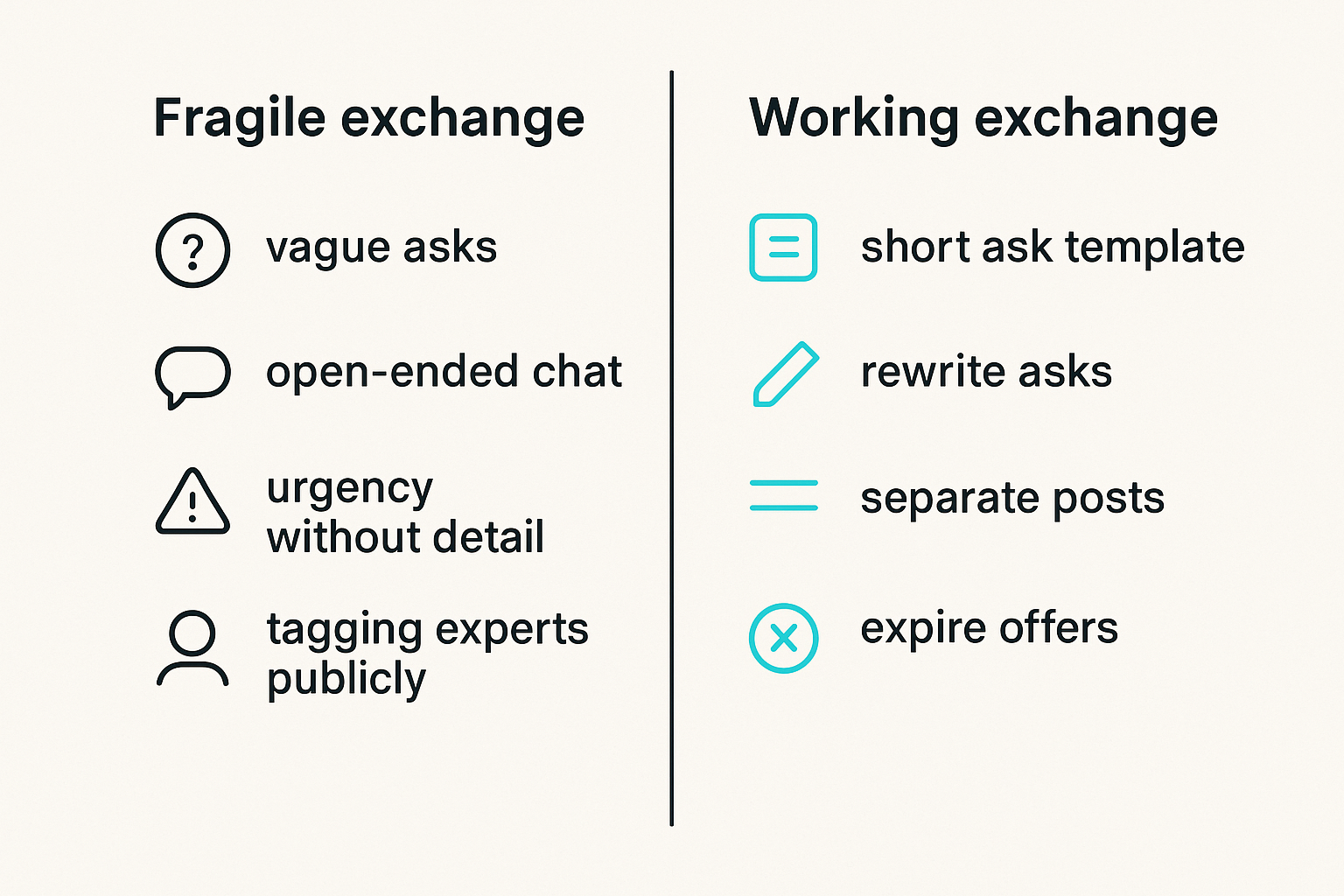
What works:
- require a short ask template;
- allow triage owners to rewrite asks with the requester;
- separate “heads up” posts from “help needed” posts;
- teach examples of good asks.
What fails:
- open-ended chat threads;
- urgency without detail;
- tagging experts publicly before scope is clear;
- rewarding the fastest reply instead of the useful one.
Dead offers create false capacity
A stale offer is worse than no offer because it creates confidence the network has capacity it does not have.
This happens when directories are treated as assets instead of obligations. Someone builds a spreadsheet of helpers, celebrates the launch, and never revisits it. Six months later, half the contacts are wrong and the other half are overloaded.
The fix is operational hygiene:
- expire offers by default;
- review high-value offers monthly;
- mark paused offers visibly;
- track when an offer was last used successfully;
- remove offers that cannot be honored.
Private channels fragment the network
Private messages are sometimes necessary. They are also where network intelligence goes to die.
If every serious ask moves into DMs, the broader network loses visibility into patterns. Leaders cannot see repeated phishing themes, vendor concerns, capacity gaps, or organizations that keep getting hit. New participants cannot learn from resolved cases.
The goal is not to ban private channels. The goal is to summarize back to the shared record at the right level of detail.
Example summary:
“Resolved: three organizations received similar payroll-themed phishing emails. Domain was not associated with the real vendor. Recommended action: block sender domain, warn staff, and report any credential entry. No client data shared in this record.”
That summary helps the network without exposing the victim organization.
Governance for shared threat intelligence asks and offers
Set permission tiers
Not every participant should see every detail. A local network may include nonprofits, city staff, schools, vendors, volunteers, funders, journalists, neighborhood leaders, and technical experts. Trust is real, but it is not uniform.
Use permission tiers that match sensitivity:
| Tier | Who can see it | Example content | Notes |
|---|---|---|---|
| Public | Anyone in the network | General guidance, training dates | No sensitive indicators tied to victims |
| Network-only | Verified members | Common scams, sanitized summaries | Useful for broad awareness |
| Restricted | Approved responders | Indicators, screenshots, technical details | Requires role-based access |
| Confidential | Named parties only | Incident details, legal concerns, client impact | Usually outside broad exchange |
The practical question is: what is the least access needed to produce the next useful action?
Moderate for usefulness, not control
Moderation is not about making the network tidy for its own sake. It is about preserving trust and usefulness.
Moderators should intervene when:
- an ask is too vague to route;
- sensitive information is exposed;
- speculation is being treated as fact;
- responders are piling on with conflicting advice;
- a vendor is being accused without evidence;
- an offer is outdated or overclaimed.
Good moderation sounds like:
- “Can you restate this as a specific decision you need support on?”
- “Please remove the client name and repost the screenshot.”
- “Moving this to restricted responders until facts are confirmed.”
- “This offer appears expired. Can the owner reconfirm capacity?”
Protect people from accidental exposure
Threat intelligence work can create reputational risk. A small nonprofit may hesitate to ask for help if it fears being labeled insecure. A school may avoid sharing a vendor concern if it might become public. A civic group may lack the language to describe an incident safely.
Design for psychological and operational safety:
- allow anonymized asks through a trusted steward;
- separate victim identity from technical indicators when possible;
- provide redaction guidance;
- avoid blame language;
- define what gets archived and for how long;
- make takedown or correction paths clear.
A network that punishes disclosure will get less disclosure. It may still have a cheerful public channel, but the real intelligence will disappear.
Metrics that show the network is working
Measure response, not volume
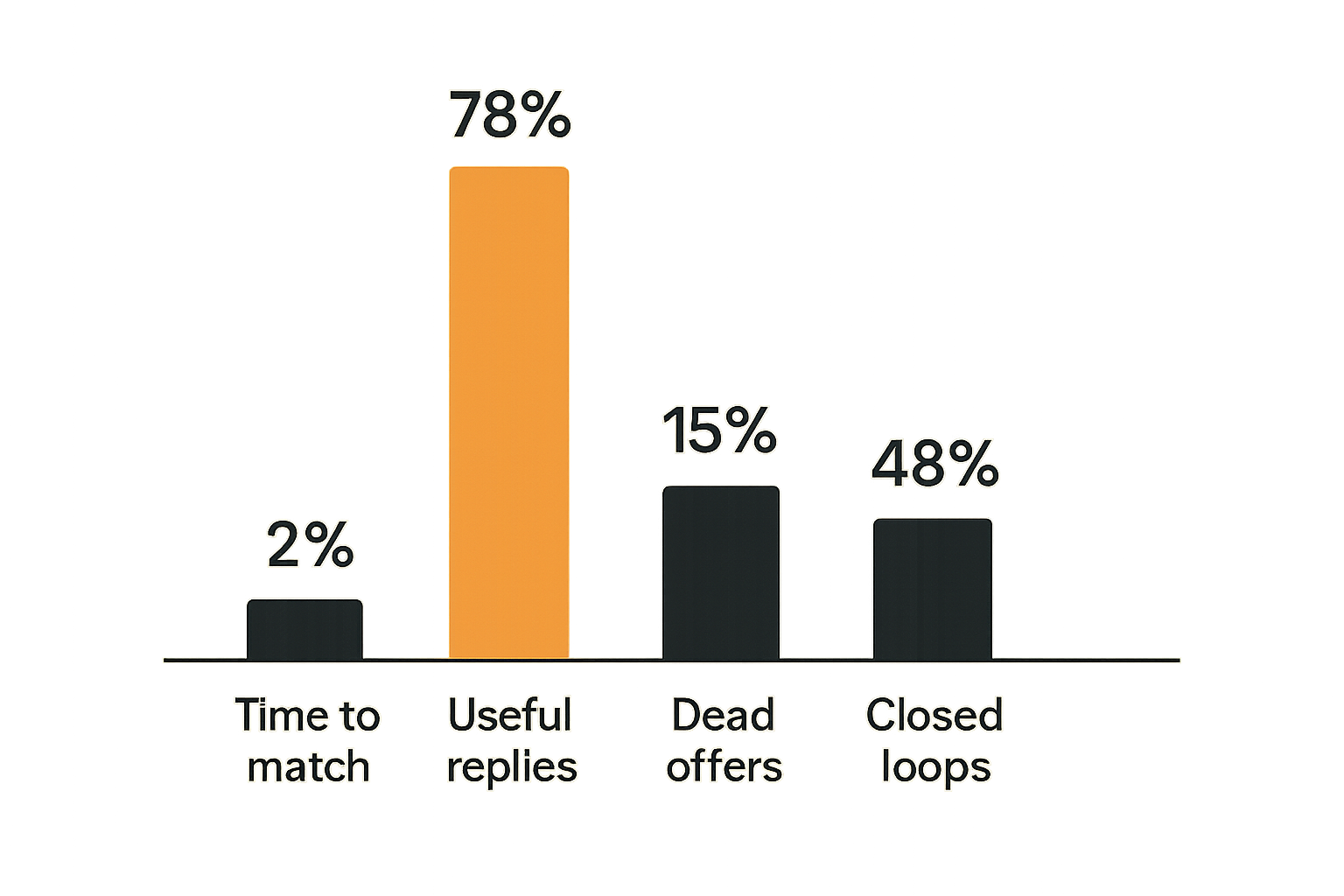
A busy exchange is not necessarily a healthy one. Volume can mean engagement, but it can also mean confusion.
Better metrics:
- time from ask submission to triage;
- time from triage to match;
- percentage of asks closed with a decision record;
- percentage of offers reviewed before expiration;
- number of repeated ask categories;
- number of asks redirected appropriately;
- requester satisfaction after closure.
Avoid vanity metrics such as total posts, total members, or total reactions. They may be useful context, but they do not prove the network can coordinate under pressure.
Track quality of matches
A match is not successful just because someone replied. It is successful when the responder can provide the needed help within the needed time and scope.
Track:
- accepted matches;
- declined matches;
- no-response matches;
- matches requiring escalation;
- repeat responders;
- overloaded responders;
- offers that produce high-quality outcomes.
This reveals capacity gaps. If every phishing ask routes to one volunteer, you do not have a phishing response capability. You have a person doing unpaid incident triage until they burn out.
Watch for hidden dependency risk
Local networks often look resilient because many organizations are connected. Under the surface, they may depend on a small number of brokers.
Warning signs:
- one person approves most restricted access;
- one expert answers most technical asks;
- one institution hosts all sensitive records;
- one funder relationship controls response capacity;
- one informal chat contains the real network memory.
Threat intelligence asks and offers should make these dependencies visible. Once visible, they can be distributed, backed up, or funded.
Tooling and data model for the exchange
Use fields that support decisions
Tools should serve the exchange model, not replace it. A spreadsheet can work for a pilot. A form plus a shared workspace can work for a small network. A dedicated platform helps when permissions, matching, history, and discovery become hard to manage manually.
The core ask fields:
- title;
- requester;
- organization type;
- category;
- description;
- specific need;
- decision deadline;
- sensitivity level;
- shareable artifacts;
- current status;
- triage owner;
- matched offer;
- closeout summary.
The core offer fields:
- title;
- provider;
- capability;
- eligible requesters;
- required inputs;
- response time;
- capacity limit;
- exclusions;
- sensitivity allowed;
- active until;
- review owner;
- status.
If a field does not help routing, trust, safety, or learning, leave it out at first.
Integrate lightly at first
The temptation is to integrate everything: email, Slack, Teams, ticketing, CRM, incident tools, membership systems, and public websites. That can be useful later. Early on, it usually creates brittle complexity.
Start with lightweight integrations:
- intake form to ask queue;
- notification to triage owners;
- reminder before deadlines;
- reminder before offer expiration;
- exportable closeout records;
- simple member verification.
The goal is not to automate the community. The goal is to reduce the coordination tax around repeated actions.
Automate reminders, not judgment
Automation should help humans keep promises. It should not decide sensitive community questions too early.
Good automation:
- “This ask has not been triaged in two hours.”
- “This offer expires in seven days.”
- “This confidential ask has no closeout summary.”
- “This responder has accepted three matches this week.”
Risky automation:
- automatically broadcasting unverified threat claims;
- auto-matching confidential asks without review;
- escalating based only on keywords;
- ranking responders publicly;
- preserving sensitive artifacts indefinitely.
A useful way to think about it is: automate the clock, the checklist, and the reminder. Keep context, judgment, and trust with people.
Product fit: from lists to a living exchange
Where d0rz fits
Most communities already have fragments of an asks-and-offers system. They have a directory, a Slack channel, a spreadsheet, a mailing list, a few trusted brokers, and a pile of institutional memory in someone’s head.
That works until the network grows, the stakes rise, or the people change.
For threat intelligence asks and offers, the platform pattern matters because the exchange needs more than posts. It needs structured asks, bounded offers, permissions, matching, review dates, and history. The UI is not the system. The system is the state model behind the exchange.
A local network should be able to answer:
- What active asks need attention?
- Which offers are currently usable?
- Who can see sensitive details?
- What has been matched but not closed?
- Which categories are recurring?
- Which capacity gaps should we fund or recruit for?
That is the architectural shift from a contact list to a living exchange.
A low-risk adoption plan
Start narrow. Do not roll out a network-wide security exchange with every possible scenario on day one.
A practical first 30 days:
- Pick one use case, such as phishing validation for nonprofits.
- Recruit three to five credible offer providers.
- Define one ask template and one offer template.
- Set sensitivity levels and a redaction rule.
- Run a tabletop exercise with fake asks.
- Open the workflow to a small group of requesters.
- Review every ask and offer after the first month.
Then expand deliberately:
- add vendor outage coordination;
- add fraud escalation contacts;
- add incident communications templates;
- add training requests;
- add regional pattern reporting.
The mistake teams make is trying to capture every possible form of help before proving that one category can move from ask to match to closeout. Prove the loop first.
Try d0rz.com
d0rz.com helps communities design practical asks-and-offers systems for real coordination work. If you are building a local network where trust, capacity, and follow-through matter, Try d0rz.com.
Threat intelligence asks and offers are not just a security concept. They are a disciplined way to turn local trust into usable action when the network needs it most.