

Your community network just got bigger. More members, more shared resources, more trust between neighbors — and more attack surface you didn't plan for.
Most community builders aren't thinking about threat intelligence. They're thinking about onboarding new members, managing shared tools, keeping the Discord or forum active. Security feels like someone else's problem — until a member account gets hijacked, shared credentials leak, or a bad actor joins the network under false pretenses and starts harvesting contact information.
Teams think the problem is "we don't have a security budget." The real problem is that local networks operate on trust infrastructure that was never designed with adversaries in mind. The same openness that makes a peer-to-peer community valuable is the thing that makes it fragile. Threat intelligence isn't about buying enterprise software. It's about understanding who might target your network, how, and what early signals look like — so you can respond before damage is done.
This guide is written for community builders and local network organizers who want a practical, grounded approach to threat intelligence that fits their actual operating context: limited resources, high trust culture, mixed technical skill levels among members.
Table of contents
- What threat intelligence actually means for local networks
- The threat landscape for peer-to-peer communities
- Building a minimal threat model for your network
- Signals and early warning for community networks
- The membership vetting problem
- Shared resource security: where most networks get hurt
- Incident response at community scale
- Communication and member education without causing panic
- Failure modes: what breaks in practice
- Connecting proactive intelligence to day-to-day operations
- How d0rz fits into a security-aware community architecture
What threat intelligence actually means for local networks
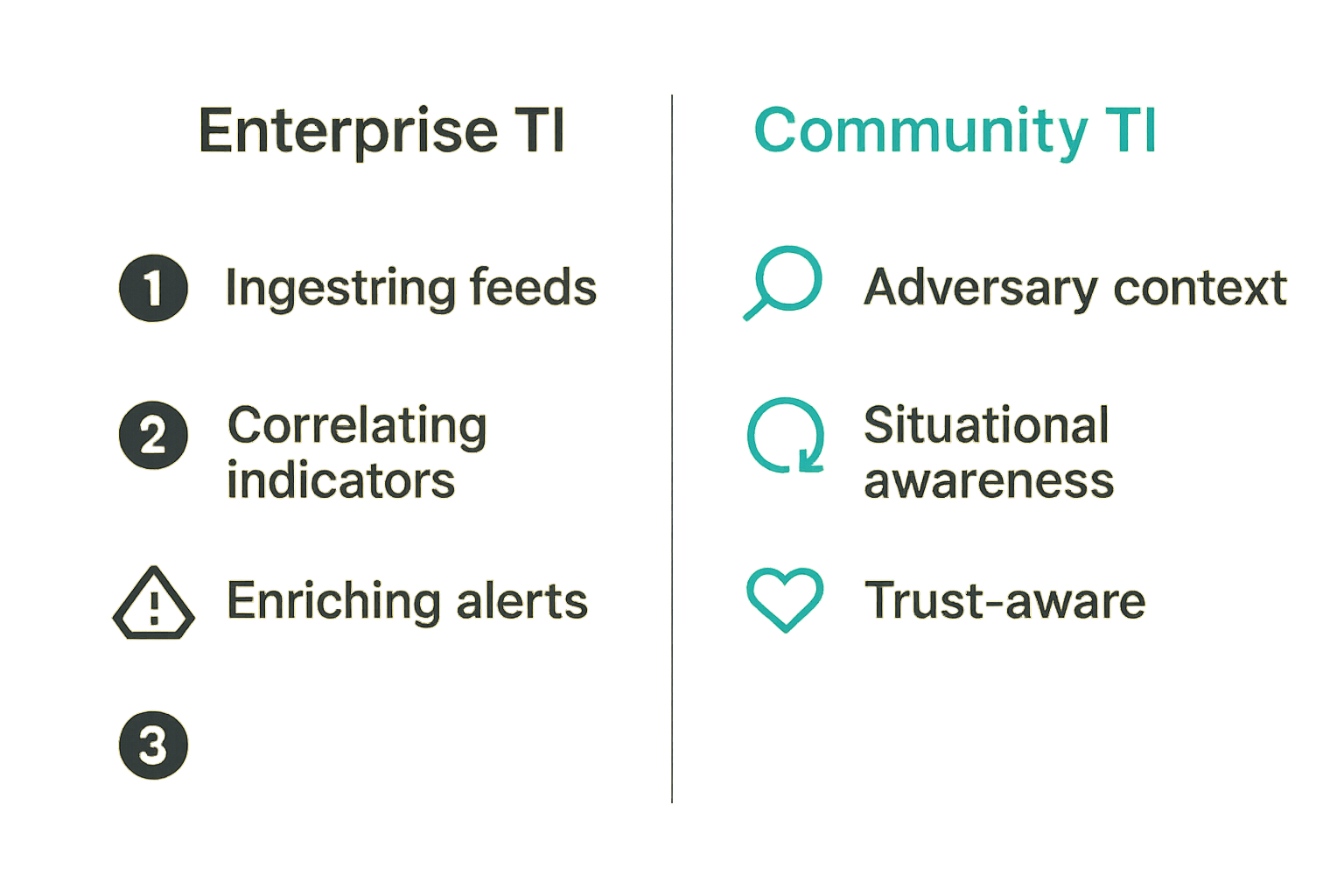
Threat intelligence, in enterprise security, is a structured discipline: ingesting feeds, correlating indicators of compromise, enriching alerts, feeding SIEM systems. That framing is mostly useless for a neighborhood tool-lending collective or a regional mutual aid network.
A useful way to think about it is this: threat intelligence for local networks is the practice of knowing your adversary context well enough to make better decisions before something goes wrong. It's less about data feeds and more about situational awareness — who is interested in your network, what they'd gain from compromising it, and what early signals of trouble look like in your specific context.
Why enterprise frameworks don't translate directly
Enterprise threat intelligence assumes dedicated analysts, integrated tooling, and a relatively well-defined network perimeter. Local community networks have none of those things. Your "perimeter" is a mix of WhatsApp groups, shared Google Drives, community forums, and physical meeting spaces. Your "analysts" are volunteers who also run the newsletter.
The mistake teams make is borrowing enterprise playbooks wholesale and then abandoning them when they don't fit. The practical question isn't "how do we implement a threat intelligence program" — it's "what information would actually change how we make decisions about membership, access, and incident response?"
That changes the conversation from tooling to information design.
The trust surface problem
Peer-to-peer networks are built on trust. That's not a bug, it's the entire value proposition. But trust creates a specific vulnerability: it makes social engineering extremely effective. An attacker who earns trusted-member status inside a community network has access to contact lists, resource pools, financial coordination channels, and the goodwill of every other member.
This is categorically different from a phishing attack on a corporation. In a community context, the damage is often relational and reputational before it's technical. Members lose trust in each other. The network fragments. Recovery is harder than any password reset.
Practical rule: Treat trust as infrastructure. Like any infrastructure, it needs maintenance, access controls, and a recovery plan.
The threat landscape for peer-to-peer communities
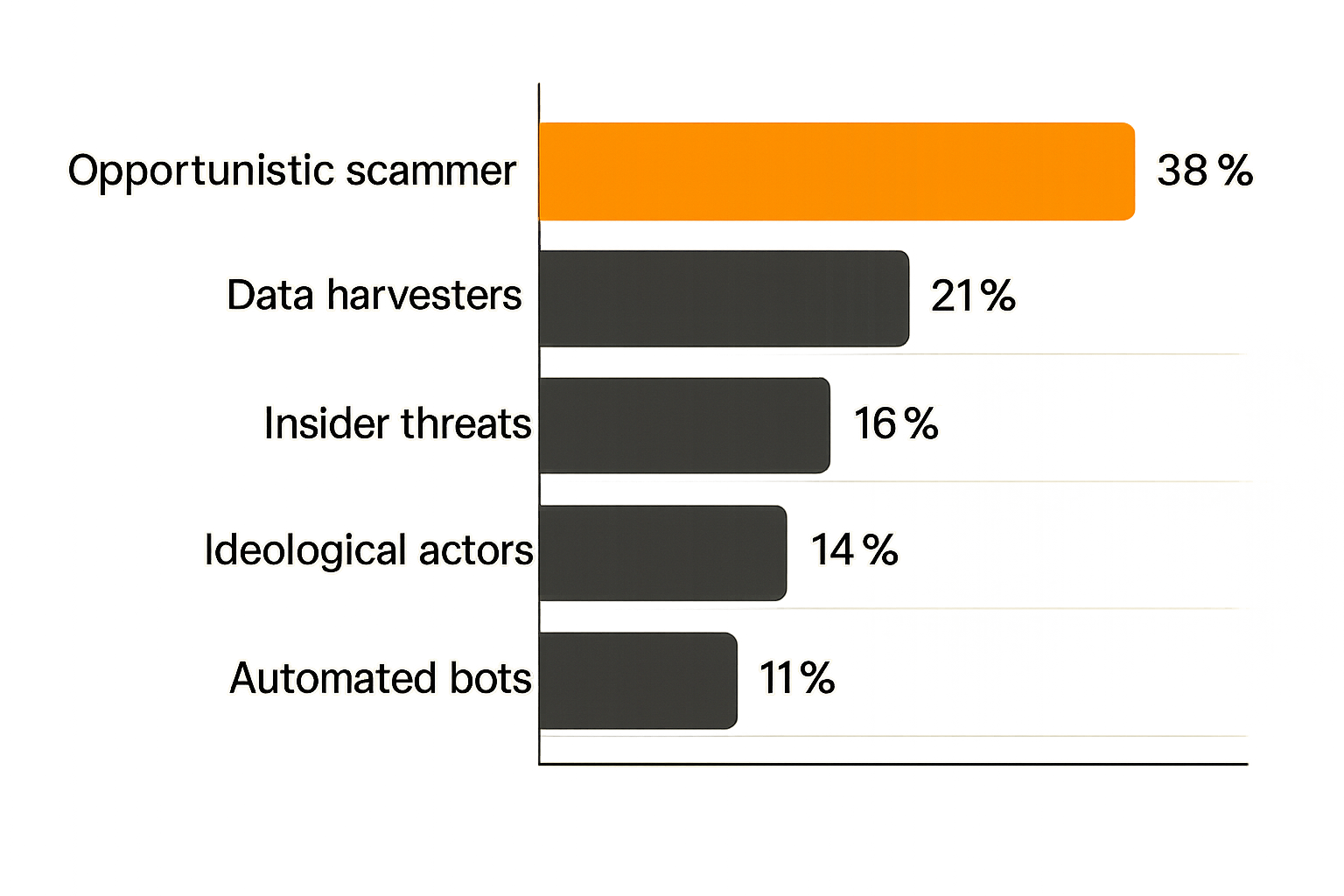
Understanding who actually targets local networks — and why — is the foundation of any useful threat intelligence posture. The good news is that most local networks are not the primary target of sophisticated nation-state actors. The bad news is that the threats they do face are often underestimated.
Common adversary types targeting local networks
Opportunistic scammers are the most common threat. They join open community networks specifically to find people offering goods, services, or financial coordination. They exploit the trust culture to run payment fraud, fake service offers, or bait-and-switch exchanges.
Data harvesters join to collect member contact information, demographic data, or community structure intelligence — often to sell or to enable targeted phishing against specific member profiles.
Insider threats emerge when a trusted member's account is compromised, or when a member turns adversarial after a dispute. This is especially painful because the network's trust mechanisms actively work against detection.
Ideologically motivated actors occasionally target communities organized around specific causes — mutual aid, political organizing, housing advocacy. These actors may attempt to disrupt, discredit, or surveil the network.
What attackers actually want from your community
| Adversary Type | Primary Target | Typical Method |
|---|---|---|
| Opportunistic scammer | Member wallets and goods | Fake listings, payment fraud |
| Data harvester | Contact lists, member profiles | Scraping, social engineering |
| Insider threat | Admin access, financial channels | Credential theft, privilege abuse |
| Ideological actor | Community cohesion, reputation | Disinformation, infiltration |
| Automated bot | Engagement metrics, spam reach | Account farming, bulk join |
Knowing this table matters because it shapes your defensive priorities. If your biggest risk is opportunistic scammers, your most valuable control is payment verification and transaction trust scoring. If your biggest risk is data harvesting, it's access controls on member directories.
Building a minimal threat model for your network
A threat model doesn't need to be a 40-page document. For most community networks, a useful threat model fits on a single page and answers three questions: what are we protecting, who might want it, and how would they get to it.
Identifying your crown jewels
Every community network has assets that, if compromised, would cause serious damage. Common examples:
- Member contact directory: Names, phone numbers, addresses, financial relationships
- Admin credentials: Access to communication platforms, shared tools, financial accounts
- Financial coordination channels: Group payment pools, shared bank access, escrow arrangements
- Reputation and trust signals: Member ratings, endorsement systems, vouching records
- Physical access information: Keys, codes, location data for shared spaces
Start with these. Rank them by impact if compromised. That ranking drives your security investment decisions.
Mapping your exposure points
Exposure points are the places where an adversary could interact with or access your crown jewels. For local networks, common exposure points include:
- Open membership processes — Anyone can join with minimal verification
- Shared credential pools — Multiple members using the same login for shared tools
- Public-facing member directories — Contact info visible to anyone with a link
- Unmoderated communication channels — No review of messages before they reach members
- Offline handoffs — Physical exchanges where digital trust signals don't apply
Practical rule: Map your exposure points before you choose controls. Controls applied to the wrong exposure point are theater, not security.
Signals and early warning for community networks
Threat intelligence is only useful if it's connected to signals you can actually observe. The mistake teams make here is waiting for an incident to create their signal list. By then, the damage is done.
Behavioral signals that matter
For community networks, behavioral signals are more useful than technical ones. Watch for:
- New members who immediately request high-value exchanges — Before establishing any trust history
- Members who ask for contact information outside platform channels — Moving relationships off-platform removes accountability
- Unusual urgency or pressure in transactions — Classic social engineering pattern
- Members who join and immediately go dormant, then reactivate — Common pattern for account farming and takeover prep
- Disputes that escalate unusually fast — May indicate a bad actor testing network response
- Requests to bypass normal verification steps — "I'm in a hurry, can we skip the usual process?"
Technical signals you can actually monitor
Even without dedicated tooling, community operators can monitor:
- Login anomalies: A member logging in from a new country or device type
- Bulk data access: Someone downloading or screenshotting the full member directory
- Unusual posting cadence: An account that suddenly posts 50 listings in an hour
- Email domain changes on accounts: A member changing their contact email to an unfamiliar provider
- Access time patterns: Admin accounts accessed at 3 AM local time
The team at threatcrush.com works with organizations handling much larger signal volumes, but the underlying logic is the same: define your normal baseline, then watch for deviations. The complexity scales, but the concept doesn't.
Practical rule: You can't detect anomalies if you've never defined normal. Spend one hour documenting what typical member behavior looks like before you try to detect unusual behavior.
The membership vetting problem
Membership vetting is where most community networks either over-engineer (creating friction that kills growth) or under-prepare (leaving the door open to every adversary type on that table above). Getting this balance right is one of the most operationally important decisions a community organizer makes.
What breaks when vetting is too loose
Open-door membership policies work until they don't. In the early stages of a network, open membership accelerates growth and builds momentum. As the network grows and accumulates value — more members, more resources, more financial coordination — the risk profile changes.
What breaks in practice:
- Trust dilution: When anyone can join, the social trust that makes peer-to-peer work erodes. Members become more cautious with everyone because they can't calibrate.
- Scammer density: Open networks attract a predictable percentage of opportunistic actors. Above a certain density, legitimate members disengage.
- Admin overwhelm: When bad actors enter, they generate disproportionate support burden — disputes, complaints, investigations.
- Reputation damage: One high-profile scam incident can undo months of community building.
Practical vetting layers for community onboarding
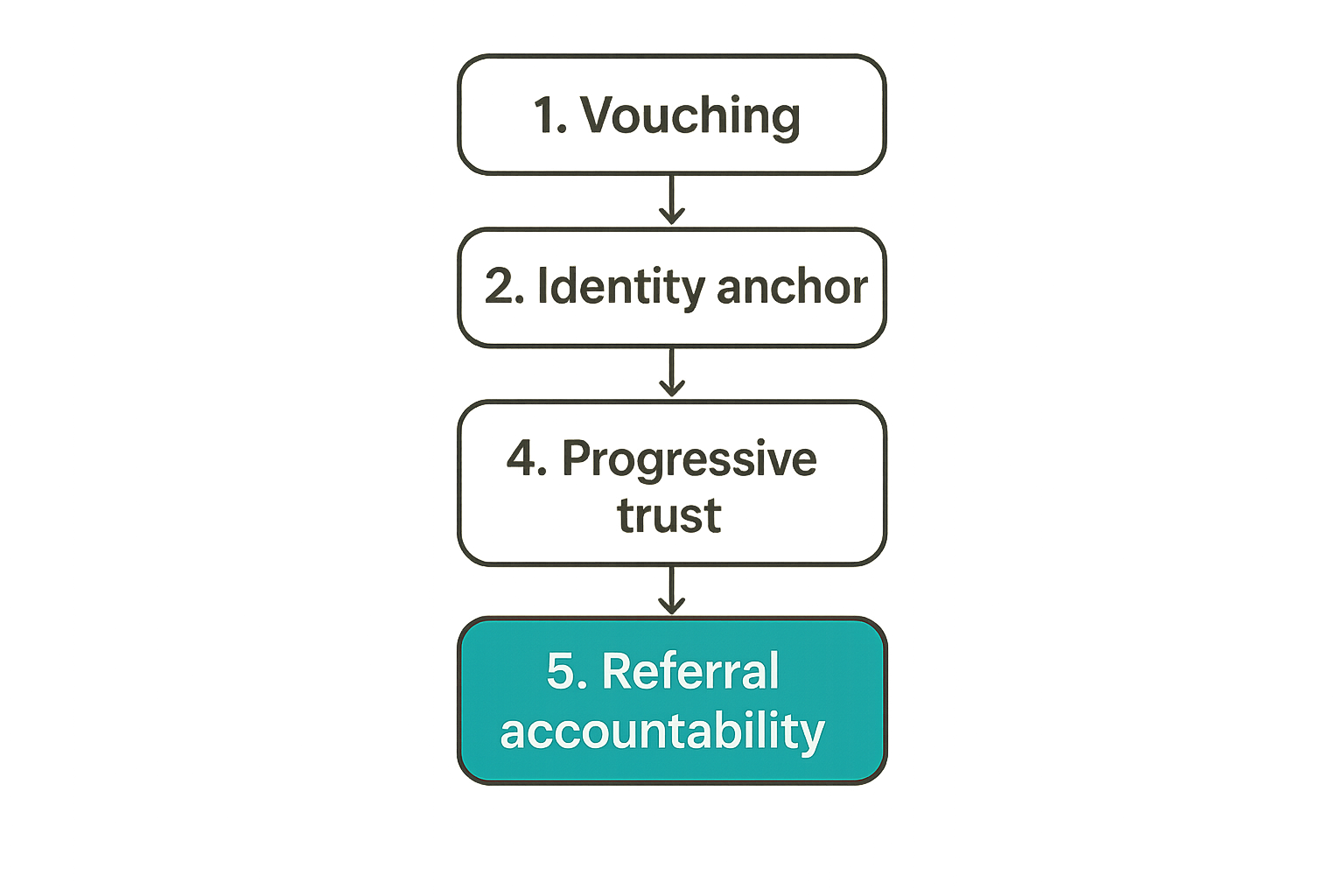
The goal is layered friction — enough to deter opportunistic actors, not so much that legitimate members bounce. A practical layered approach:
- Vouching requirement: New members must be introduced by an existing trusted member. Scales the network through social accountability.
- Identity anchoring: Require a real name and at least one verifiable contact point (email domain, phone, social profile). Not foolproof, but raises the cost of throwaway accounts.
- Probationary period: New members have limited access for the first 30 days. They can participate but can't initiate high-value exchanges or access the full member directory.
- Progressive trust: Access to higher-value resources (shared tools, financial channels, admin roles) requires accumulated reputation within the network.
- Referral accountability: The member who vouches for a bad actor faces consequences. This aligns incentives for careful introductions.
This isn't a perfect system. A patient adversary can invest the time to build a false reputation. But most adversaries are opportunistic — they'll move to an easier target when friction exists.
Shared resource security: where most networks get hurt
Shared resources — tools, spaces, credentials, financial pools — are the practical reason community networks exist. They're also where most security incidents actually occur. The problem isn't malice alone; it's that shared resource management is genuinely hard and most communities don't design it intentionally.
Credential sharing and access management
The single most common security failure in community networks is shared credentials: one login for the community newsletter platform, one password for the shared cloud storage, one admin account for the community forum — all passed around by word of mouth, never rotated, never audited.
What works:
- Use a password manager with team sharing features (Bitwarden Teams, 1Password for Teams — both have free or low-cost tiers)
- Never share credentials over chat — use the password manager's direct share function
- Assign individual logins where the platform supports it, even if the account is shared
- Rotate credentials when any member leaves an admin role
- Keep a simple access log: who has access to what, since when
What fails:
- Sharing passwords over WhatsApp or email threads that are hard to clean up
- Relying on "everyone knows not to share this" as a control
- Never auditing who actually has access to what
- Using the same password across multiple shared accounts
Protecting shared digital infrastructure
Beyond credentials, shared infrastructure — shared hosting, shared domains, shared cloud storage — needs ownership clarity. In practice, many community networks have infrastructure whose ownership is tied to a single member who helped set it up. When that member leaves (or their account gets compromised), the community loses access to its own infrastructure.
A minimal protection checklist:
- Every shared service should have at least two admin-level accounts owned by different members
- Domain registration and hosting billing should be tied to a community email account, not a personal one
- Cloud storage access should be reviewed quarterly — remove former members promptly
- Critical documents should have backup copies in a second location, independent of the primary sharing platform
Incident response at community scale
Most community networks have no incident response plan. The first time something goes wrong, they improvise. Improvised response is slow, inconsistent, and often makes things worse — especially when the incident involves member trust.
Defining what counts as an incident
Not every problem is a security incident. A useful working definition for community networks:
A security incident is any event that threatens the confidentiality of member data, the integrity of community resources, or the safety of members — and requires coordinated response.
Examples that qualify:
- A member account is clearly compromised and sending phishing messages to the network
- Member contact information is confirmed to have been exported or shared without authorization
- A member is confirmed to have defrauded other members using the network's trust infrastructure
- Admin credentials for a critical platform are confirmed lost or exposed
Examples that don't qualify as incidents (but still need handling):
- A member dispute over a transaction gone wrong
- A member posting spam or off-topic content
- Someone forgetting their password
A lightweight response workflow
- Identify and confirm: Before taking action, verify the incident is real. One report of suspicious behavior is a signal; two independent reports is a trigger.
- Contain immediately: Suspend the affected account or revoke the compromised credential. Don't wait for full investigation before containing.
- Notify affected members: Tell the people directly impacted, briefly and factually. Don't over-communicate to the full network until you know the scope.
- Investigate: Gather the facts. What was accessed? What was exposed? Who else was affected?
- Remediate: Fix the root cause, not just the symptom. If a credential was stolen, change all related credentials. If vetting was bypassed, close the gap.
- Document and review: Write a one-paragraph incident summary. Review whether your controls would catch this faster next time.
Communication and member education without causing panic
One of the hardest parts of security in community networks is communication. Over-communicate and you cause panic, erode trust in the network's safety, and accelerate member churn. Under-communicate and members feel blindsided, which causes the same outcome on a delay.
How to frame security to a non-technical audience
The framing that works: security as community care. "We want to make sure our network stays safe for everyone" lands better than "we've implemented a threat intelligence program."
Specific language patterns that work:
- "We've added a step to protect your contact information" instead of "we've implemented access controls on the member directory"
- "Please check that your account is secure" instead of "rotate your credentials immediately"
- "We noticed some unusual activity and handled it" instead of "we had a security incident affecting N accounts"
Be honest about incidents when they affect members directly. Vague reassurances without substance erode trust faster than a clear, factual explanation.
Building a security culture that fits your community
Security culture in a community network isn't a policy document — it's a shared set of norms. Those norms form over time through consistent leadership behavior and low-friction reinforcement:
- When organizers model good behavior (using the password manager, going through the same vetting process as everyone else), it signals that these norms apply to everyone
- Short, specific reminders are more effective than long security guides that no one reads
- Positive reinforcement — acknowledging members who flag suspicious activity — works better than blame after incidents
- New member onboarding is the highest-leverage point for security culture; it's easier to set expectations early than to correct behavior later
Failure modes: what breaks in practice
Most security programs for community networks fail in one of two directions: over-engineering or under-preparing. Both are common, and both are predictable.
Over-engineering vs. under-preparing
| Failure Mode | What It Looks Like | What It Costs |
|---|---|---|
| Over-engineering | Implementing enterprise-grade controls for a 50-person network | Member friction, volunteer burnout, growth slowdown |
| Under-preparing | No vetting, shared passwords everywhere, no incident plan | Scammer incidents, data leaks, trust collapse |
| Reactive-only posture | Responding to incidents but never reviewing root causes | Same incidents recur; incremental erosion of member trust |
| Security theater | Visible controls that don't address real exposure points | False confidence; actual vulnerabilities persist |
| Single point of failure | One person owns all admin access and security decisions | Network paralyzed when that person is unavailable |
The right operating point is intentional minimum: the smallest set of controls that addresses your actual threat landscape, implemented consistently.
The volunteer fatigue trap
Community networks run on volunteer energy. Security overhead competes directly with the activities that make the network valuable. The mistake teams make is assigning security responsibilities without accounting for volunteer capacity.
What breaks in practice: the person who set up the security controls leaves or burns out. No one else knows how the controls work, so they gradually decay. A year later, the network has the appearance of security without the substance.
Mitigation:
- Document every security control in plain language, not just in the head of whoever implemented it
- Distribute security responsibilities across at least two people
- Schedule a quarterly 30-minute "security review" — just enough to catch decay before it becomes a gap
- Make it easy for members to report concerns without making it feel like surveillance
Connecting proactive intelligence to day-to-day operations
The gap between threat intelligence and actual community operations is where most of the value gets lost. You can have a perfect threat model and a well-designed vetting process, but if those don't connect to what moderators and organizers actually do every day, they're shelf documents.
Making intelligence actionable for organizers
Actionable intelligence for community operators means translating threat patterns into specific decision prompts:
- "If you see a new member requesting a high-value exchange within their first week, flag it for review before approving" — not "be aware of insider threats"
- "If a member contact email changes, send a verification message to the old address" — not "monitor for account takeover signals"
- "If two members independently report the same account as suspicious, suspend first and investigate after" — not "investigate suspicious behavior reports"
The pattern: threat intelligence tells you what to watch for; operational procedures tell organizers exactly what to do when they see it. Without the second half, intelligence is academic.
When to escalate outside the community
Most community security incidents can and should be handled internally. But some situations require external escalation:
- Law enforcement: If an incident involves financial fraud, credible threats of physical harm, or confirmed identity theft
- Platform providers: If accounts on a third-party platform are compromised, report to that platform's trust and safety team
- Legal counsel: If member data exposure creates potential liability, consult before communicating broadly
- Other community networks: If you identify an adversary pattern that may be targeting multiple local networks, quiet disclosure to peer organizers is a form of collective threat intelligence
That last point is underused. Local networks often face the same adversary types. A scammer who exploited one mutual aid network may be testing others. Informal peer-to-peer information sharing among organizers is genuinely valuable and doesn't require sophisticated tooling.
How d0rz fits into a security-aware community architecture
Building threat intelligence into a community network isn't just about policies and playbooks — it's about the platform architecture that underpins your network. When your platform supports identity anchoring, progressive trust, moderated access, and clear ownership of shared resources, it does a significant amount of the security work structurally, rather than through manual enforcement.
Platform features that support safer peer-to-peer networking
When evaluating or configuring a platform for your community, look for features that map directly to the threat model and controls discussed in this guide:
- Identity verification support: The platform should support linking accounts to verifiable identity anchors — email, phone, or social profiles — without requiring invasive data collection
- Tiered access controls: Different access levels for new members, established members, and organizers — matching your progressive trust model
- Audit logging: The ability to see who accessed what and when, at a minimum for admin-level actions
- Moderation tools: The ability to suspend accounts quickly, review flagged content, and manage the onboarding funnel
- Private communication channels: Secure channels for organizer coordination that are separate from general member communication
- Resource ownership clarity: Clear attribution of who owns and administers each shared resource — not tied to personal accounts that could churn
A platform that makes these controls easy to use is one that makes it practical for volunteer-run networks to maintain them consistently over time. That's the difference between security that holds and security that decays.
This post was contributed by the team at threatcrush.com as a guest piece for d0rz.com. The threat intelligence frameworks here are adapted from production security workflows to fit the specific operating context of community builders and local network organizers.
Try d0rz.com
d0rz is the platform built for direct community connection and peer-to-peer resource sharing — designed so that the architecture works with your community's trust model, not against it.