

Community building software for local groups usually gets purchased when the spreadsheet breaks, the group chat gets noisy, or the organizer stops being able to remember who offered what.
Teams think the problem is engagement. The real problem is coordination memory.
A local group can look active and still fail operationally. People post requests, volunteers reply, someone says they can help, and then the thread disappears under announcements, introductions, and calendar reminders. The group has energy. It does not have a reliable operating system.
That changes the conversation. The practical question is not which community platform has the cleanest feed. It is which software helps a local group capture asks, expose offers, route trust, close loops, and learn what keeps breaking.
Table of contents
- The real job of community building software for local groups
- Map asks, offers, and trust before you buy software
- What community building software for local groups must track
- The workflow architecture from intake to follow-up
- Matching and routing are the core operating loop
- Trust, safety, and local context cannot be bolted on later
- Notifications, cadence, and participation quality
- Metrics that matter for local group operators
- Common failure modes and what breaks
- Build, buy, or assemble a lightweight stack
- Where d0rz.com fits local network operations
The real job of community building software for local groups
Community tools are often evaluated like media products. Does the feed look good? Can people comment? Can we send announcements? Can we host events?
Those things matter, but they are not the operating core. The operating core is whether a real need can move from unclear to handled without depending on memory, luck, or one heroic organizer.
What the tool is actually responsible for
A useful way to think about it is this: community building software for local groups should preserve the state of coordination.
That means it should answer questions like:
- What did someone ask for?
- Who is able to help?
- Has anyone responded?
- Is the request still open?
- Is the person trustworthy enough for this type of exchange?
- What happened after the match?
- What should the operator do next?
The mistake teams make is treating posts as records. A post is an input. It is not a workflow state. A thread can contain a need, an offer, a partial answer, a cancellation, and a side conversation. If the software does not extract or structure the useful state, the organizer has to do it manually.
Practical rule: If the group cannot tell what is open, matched, completed, stale, or unsafe, it does not have community operations. It has conversation history.
Why local groups have a smaller failure budget
Local networks are more sensitive than broad online communities. If a remote discussion forum drops a thread, people move on. If a neighborhood group drops a childcare request, a repair referral, a ride need, or a small business lead, trust takes damage.
Local groups also run on repeated proximity. People see each other again. A poor match, a ghosted request, or an unverified provider is not just a bad user experience. It becomes local memory.
This is why prior thinking about local network architecture matters. The software has to support how trust, routing, and follow-up work in the real world, not just how posts appear in a feed.
Related reading from our network: teams building software products face a similar trap when they copy interfaces without copying operating logic, which is the point of Product examples are not inspiration.
Map asks, offers, and trust before you buy software
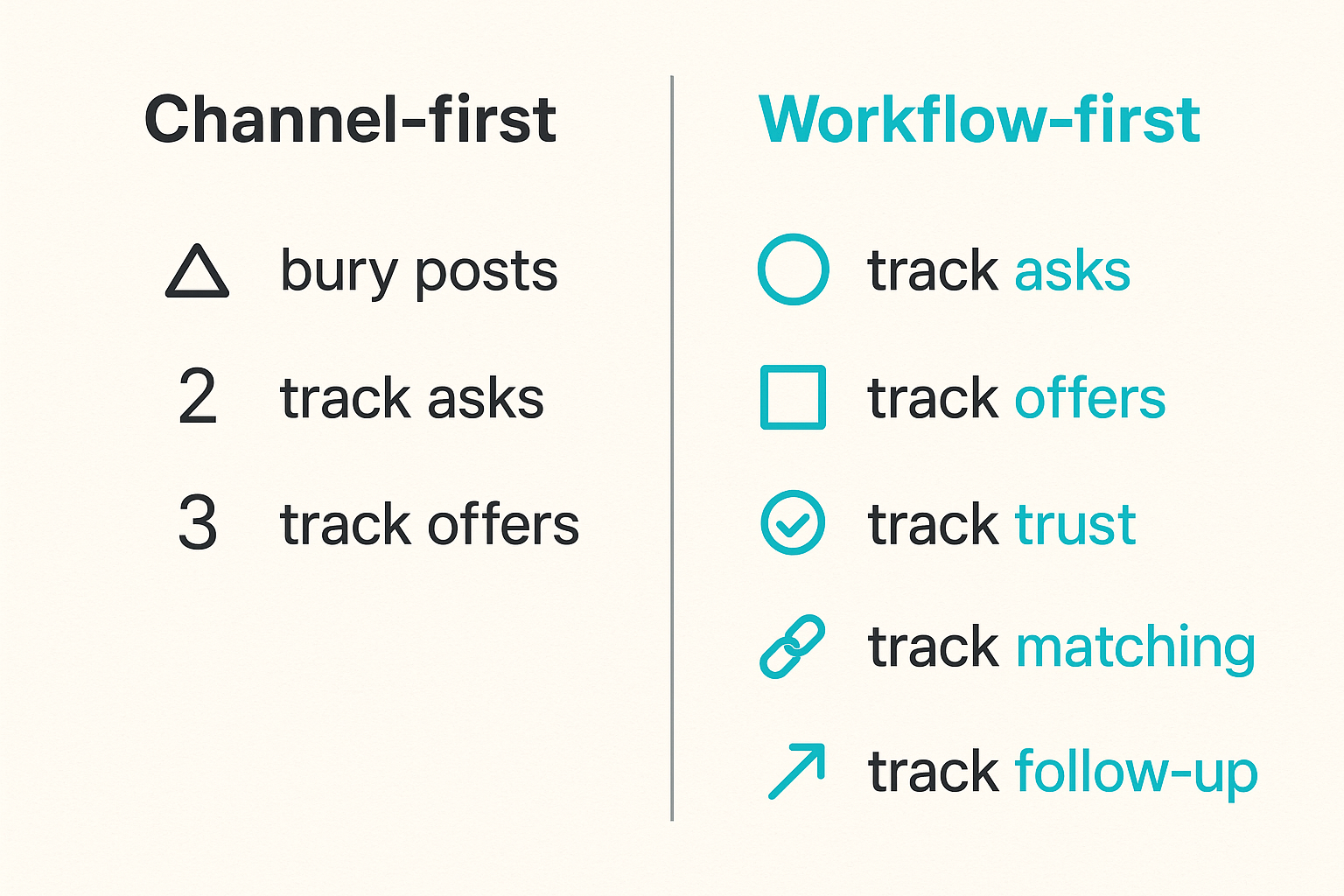
Before choosing software, map the workflow your group already runs informally. Most local operators have one; it is just hidden in texts, introductions, spreadsheets, and memory.
The practical question is: what is the smallest reliable path from need to outcome?
Start with the local transaction, not the channel
Do not start with Slack versus Discord versus Facebook versus a custom platform. Start with the local transaction.
Examples:
- A parent needs help moving furniture.
- A freelancer is available for website fixes.
- A small business needs someone to debug a form.
- A neighbor can drive an elderly resident to an appointment.
- A local organizer needs volunteers for a one-day event.
Each transaction has different risk, urgency, and matching logic. A ride request has safety implications. A website debugging request may need credentials or payment handling. A volunteer request may need availability and location. Treating all of them as posts is how groups lose operational detail.
Separate participation from fulfillment
Participation is someone liking, replying, attending, introducing themselves, or offering availability. Fulfillment is the need getting handled.
Community software often optimizes participation because it is easy to count. Local operators should optimize fulfillment because that is what builds trust.
| Evaluation lens | Weak software behavior | Strong software behavior |
|---|---|---|
| Asks | Buried in posts | Structured by category, urgency, and status |
| Offers | Mixed with introductions | Searchable by capability, area, and constraints |
| Trust | Assumed from membership | Explicit signals, verification, and history |
| Matching | Whoever replies first | Routed by fit, availability, and risk |
| Follow-up | Left to the organizer | Tracked until closed or escalated |
| Learning | Anecdotal | Patterns visible across requests |
Practical rule: A local group grows stronger when it remembers fulfilled needs, not when it generates more posts.
What community building software for local groups must track
Community building software for local groups does not need to be bloated. In fact, a smaller system is often better if it tracks the right things.
The mistake teams make is buying a large engagement suite and then using 10 percent of it. The real requirement is a clean operating model.
The minimum useful data model
At minimum, the system should track four objects:
- Member: who someone is, where they operate, and what trust signals are known.
- Ask: what someone needs, when they need it, and what constraints apply.
- Offer: what someone can provide, under what conditions, and where.
- Interaction: the match, message, handoff, completion, rating, or escalation between people.
You can run this in a purpose-built platform, a structured database, or a careful no-code stack. But if those four objects are not represented somewhere, the operator will recreate them manually.
A local ask for one public workflow to automate, like seeking one public business workflow to automate, is a simple example. The ask is not just text. It has scope, sensitivity, location, expected outcome, and potential responders.
Status beats volume
Most dashboards overcount volume and undercount state. A group with 200 posts and 20 unresolved needs is not healthier than a group with 30 posts and 25 closed loops.
Useful statuses are plain:
- Draft
- Open
- Needs clarification
- Routed
- Matched
- In progress
- Completed
- Stale
- Escalated
- Closed without match
These statuses do not need to be fancy. They need to be visible. Once status is visible, the operator can triage instead of scroll.
Practical rule: If the next action is not obvious, add status before adding another communication channel.
The workflow architecture from intake to follow-up
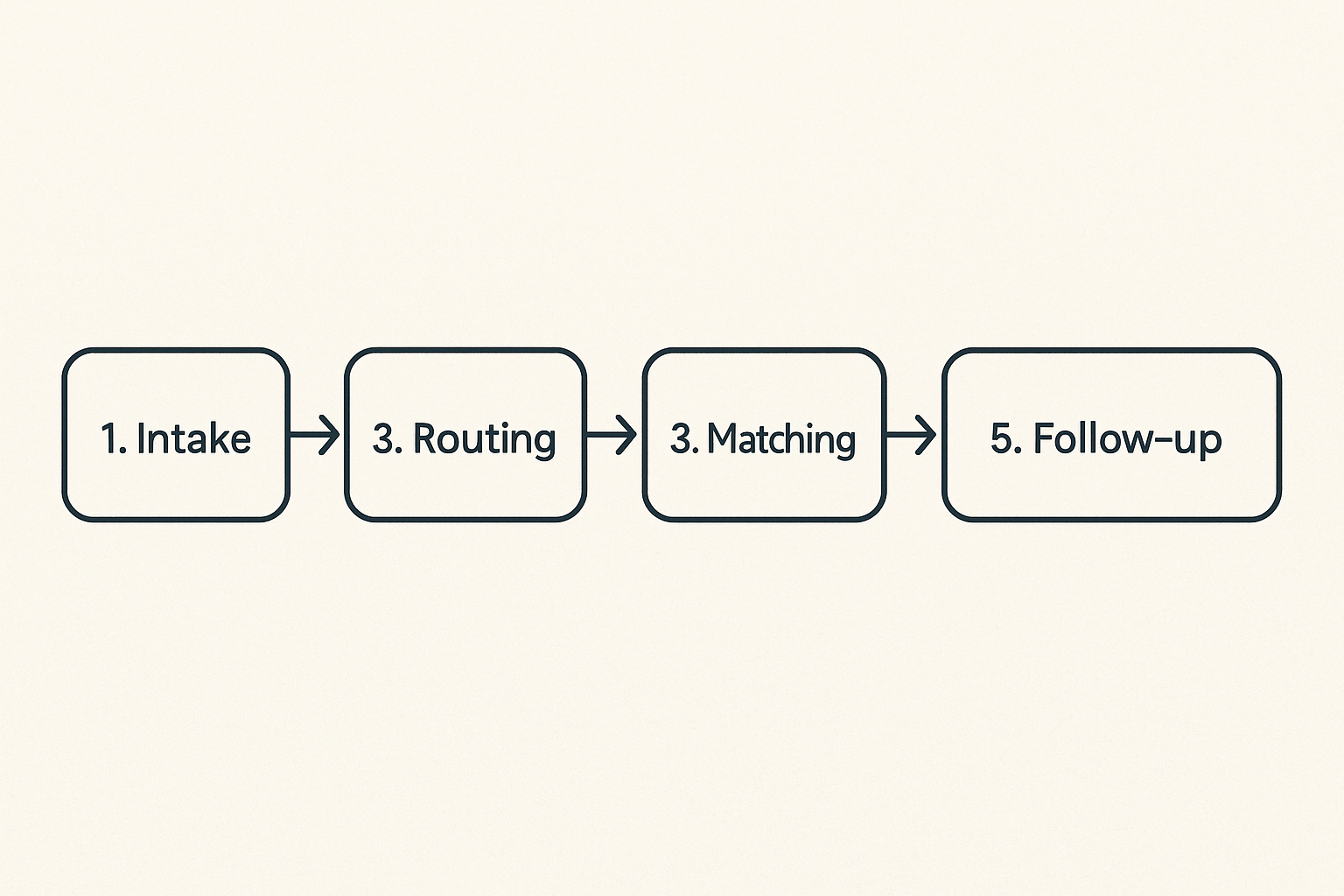
A local network is an operations system. The software should reflect the path work actually takes.
What breaks in practice is that intake, matching, messaging, and follow-up live in different places. Someone submits a form. Someone else messages the organizer. A volunteer replies in a group chat. A spreadsheet gets updated later, maybe. By the time there is a problem, nobody knows which record is authoritative.
A practical implementation sequence
Start with one repeatable workflow. Do not redesign the whole community at once.
- Define the main category of exchange. For example: errands, small business help, local referrals, volunteer shifts, ride coordination, or home services.
- Create structured intake. Ask for category, location, urgency, deadline, constraints, and permission to share details.
- Normalize offers. Capture skills, availability, service area, price range if relevant, and boundaries.
- Add routing rules. Decide what gets auto-suggested, what requires organizer review, and what should never be matched automatically.
- Track status. Every ask needs one current state and one next action.
- Close the loop. Confirm whether the need was met, whether the match was appropriate, and whether follow-up is needed.
- Review weekly. Look for repeated asks, missing offers, unsafe patterns, and response delays.
This sequence sounds basic because it is basic. That is the point. Local groups fail less from missing advanced features and more from missing operating discipline.
Where automation helps and where it hurts
Automation is useful for reminders, duplicate detection, category suggestions, stale request alerts, and routing low-risk requests to obvious matches.
Automation is dangerous when it hides judgment. Do not auto-route sensitive requests just because two profiles match. Do not auto-promote unverified providers into high-trust categories. Do not let a model infer sensitive attributes from casual member text.
Related reading from our network: remote teams run into the same distinction between tool and workflow in Zoom video chat for remote teams, where the call is only useful when the surrounding operating process is clear.
Matching and routing are the core operating loop
A community platform without matching logic is a bulletin board. Bulletin boards are useful, but they put all the work on the reader.
Local networks need routing. Routing does not always mean an algorithm. It means the system has a way to decide who should see what, who should act, and when the operator should intervene.
Routing rules for small local networks
Good routing starts simple:
- Match by geography when travel matters.
- Match by category when skills matter.
- Match by urgency when time matters.
- Match by trust level when risk matters.
- Match by availability when follow-through matters.
- Match by relationship when personal context matters.
A request for help lifting a couch should not be routed the same way as a request for home access, payment handling, elder care, or childcare. The software should make those differences visible.
A public offer such as remote website and automation help for local businesses works well as structured supply because the capability, audience, and delivery boundary are explicit.
When the human operator stays in the loop
The operator should stay in the loop when:
- The request involves a vulnerable person.
- Money, keys, transportation, health, or personal data are involved.
- The responder is new or unverified.
- The ask is ambiguous.
- The request has conflict potential.
- The match crosses social boundaries inside the group.
This is not anti-automation. It is responsible routing. Many local networks need software that reduces low-value manual work so humans can focus on judgment-heavy cases.
Practical rule: Automate reminders and visibility before you automate trust decisions.
Trust, safety, and local context cannot be bolted on later
Trust is not a profile badge you add after launch. It is part of the workflow design.
Local groups often begin with ambient trust. Everyone knows someone. The first 30 members are friends, neighbors, or referrals. Then the group grows. New people arrive. The operator cannot personally vouch for everyone. The informal trust model stops scaling.
Lightweight verification is still verification
Verification does not have to mean heavy compliance. It can be tiered:
- Email or phone confirmed
- Local area confirmed
- Referred by known member
- Completed low-risk exchange
- Completed paid work
- Identity checked for sensitive categories
- Organizer-approved for higher-risk routing
The key is to connect verification to permissions. A new member can browse and respond to low-risk asks. A verified provider can receive higher-trust referrals. A known volunteer can be routed into time-sensitive support.
Do not collect sensitive data because it feels official. Collect the smallest trust signal that changes a routing decision.
Make reputation portable inside the group
Reputation should not live only in the organizer's head. If someone reliably completes small tasks, that should inform future routing. If someone repeatedly ghosts, that should also inform routing.
But reputation has to be handled carefully. Local context is messy. A missed task might reflect illness, family obligations, unclear instructions, or a bad fit. The system should track outcomes without turning people into permanent scores.
A useful pattern is private operational notes plus visible completion history where appropriate. Operators need memory. Members need fairness.
Related reading from our network: SOC teams face a parallel problem with trust in evidence and roles, which is why cybersecurity certifications for SOC teams focuses on how signals fit operational workflows instead of treating credentials as decoration.
Notifications, cadence, and participation quality
Most local groups do not need more notifications. They need better targeting.
The mistake teams make is blasting every update to everyone and then wondering why participation drops. People ignore noisy systems. Once they ignore the system, urgent needs stop getting seen.
The notification problem is a routing problem
Notifications should be tied to role, relevance, and actionability.
A good notification says:
- Why am I receiving this?
- What action is expected?
- How urgent is it?
- What happens if I ignore it?
- Can I opt into more or less of this type?
A weak notification says there is activity. Activity is not enough.
For example, a volunteer who opted into weekday rides within three miles should get a ride request that matches those constraints. They should not get every announcement, every introduction, and every general update.
Cadence should match local behavior
Cadence is operational design. Some local networks work daily. Others work weekly. Some need real-time alerts only for emergencies. Others need a digest.
Good cadence options include:
- Immediate alerts for urgent asks.
- Daily digest for open needs.
- Weekly operator review.
- Monthly member recap.
- Stale request reminders after a defined interval.
Do not let the software vendor's default cadence become your community rhythm. Local behavior should drive the settings.
Metrics that matter for local group operators
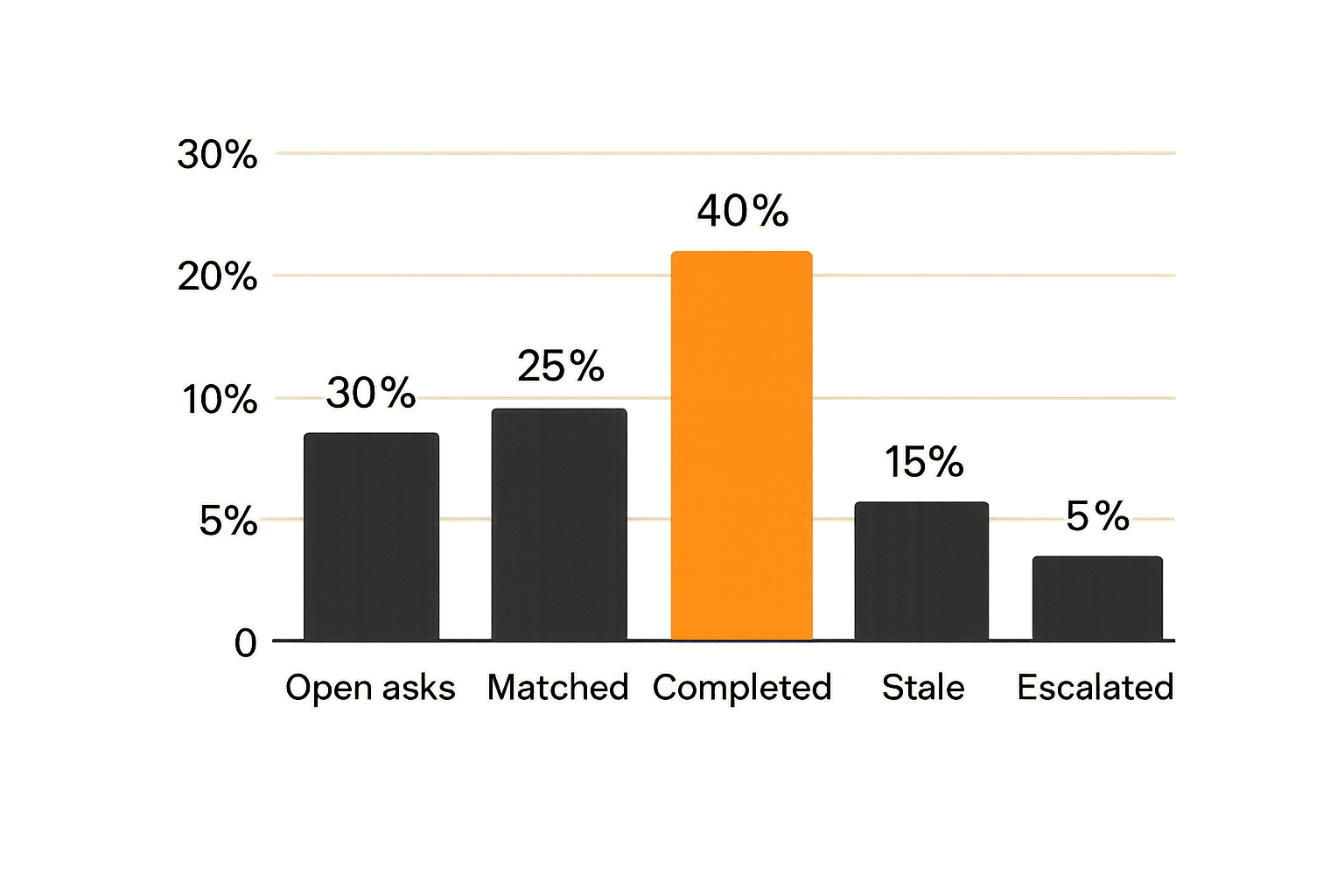
Metrics are useful when they improve decisions. They are harmful when they create fake confidence.
Community building software for local groups should make operational health visible. It should not push operators toward vanity metrics just because they are easy to graph.
Measure closed loops, not impressions
Track metrics that show whether the network is becoming more reliable:
- Open asks by category
- Time to first useful response
- Time to match
- Completion rate
- Stale request count
- Repeat asks without supply
- Active offers by category
- Escalations by risk type
- Follow-up completion
The best metric is often boring: how many needs were handled without the organizer chasing people manually?
That metric tells you whether the software is reducing operational drag or merely making the group look busy.
Use metrics to improve operations, not decorate reports
Metrics should drive weekly adjustments.
If time to first response is slow, improve routing or notifications. If many asks go stale, clarify intake or add operator review. If one category has repeated demand and no supply, recruit specific providers. If completion is low after matching, check whether offers are overstated or instructions are unclear.
Here is a simple operator review table:
| Signal | Likely cause | Operator action |
|---|---|---|
| Many open asks | Intake is working, supply may be thin | Recruit offers by category |
| Fast replies, low completion | People are interested but not committed | Add confirmation and reminders |
| High stale count | No owner for follow-up | Assign review cadence |
| Same ask repeats | Structural need in the area | Create a standing offer or partner |
| Escalations rising | Trust or scope problem | Tighten verification and routing |
The point is not analytics theatre. The point is a shorter path from signal to operational change.
Common failure modes and what breaks
Software does not fail only because it has bugs. It fails because the operating model around it is unclear.
What breaks in practice is usually predictable.
What fails when software becomes a bulletin board
A bulletin board can be fine for announcements. It is weak for coordination.
Common symptoms:
- Asks are duplicated because nobody can see current status.
- Offers go stale because nobody knows whether the person is still available.
- High-trust needs get posted publicly because there is no safer intake path.
- New members cannot understand how to help.
- Organizers spend their time answering the same questions.
- Good contributors burn out because they receive irrelevant pings.
This is the failure mode of more activity, less reliability.
What fails when everything depends on one organizer
The heroic organizer pattern works until it does not. One person remembers the reliable plumber, the neighbor with a van, the volunteer who prefers mornings, the business owner who needs help, and the member who should not be routed into sensitive tasks.
Then that person gets sick, busy, tired, or moves away.
If the software does not capture operating memory, the group loses capacity overnight. A prior article on the local network operating model frames this as a systems problem: the community has to distribute coordination without losing accountability.
The fix is not to remove human judgment. The fix is to make judgment easier to hand off.
Build, buy, or assemble a lightweight stack
There is no universal answer. The right choice depends on risk, volume, budget, technical capacity, and how much the group needs structured exchange versus conversation.
The mistake teams make is asking which platform is best. The better question is: what operating capability do we need next?
The comparison local operators should actually make
| Option | Works when | Fails when | Operator burden |
|---|---|---|---|
| Group chat | Small, trusted, low-risk group | Needs require status, routing, or search | High as volume grows |
| Spreadsheet plus forms | Early structured intake | Matching and trust become complex | Medium, but manual |
| Generic community platform | Content and events matter most | Fulfillment and follow-up matter more | Medium to high |
| CRM or ticketing tool | Requests behave like cases | Members need public asks and offers | Medium |
| Custom software | Workflow is specific and stable | Requirements are still changing | High upfront |
| Purpose-built local network tool | Asks, offers, routing, and trust are central | Group only needs announcements | Lower if model fits |
Do not overbuild too early. Also do not pretend a chat thread is a system of record when people are depending on outcomes.
What works for the first 90 days
For most local groups, the first 90 days should prove the operating loop.
What works:
- Pick one or two exchange categories.
- Make asks and offers structured.
- Keep routing rules simple and visible.
- Review open items weekly.
- Close every loop, even if the result is no match.
- Capture why matches failed.
- Recruit supply based on observed demand.
What fails:
- Launching 20 categories on day one.
- Treating member count as the main goal.
- Depending on public comments for sensitive requests.
- Letting stale offers remain searchable.
- Adding automation before status is clean.
- Hiding operational work from members until trust breaks.
A 90-day pilot should answer one question: can this group repeatedly turn local intent into completed coordination?
Where d0rz.com fits local network operations
For d0rz.com, community building software for local groups is not a content problem. It is a practical network operations problem.
The brand one-liner is intentionally operational: d0rz.com is for people building practical local networks where asks, offers, trust, routing, and follow-up matter.
Use d0rz.com when the network needs visible asks and offers
d0rz.com fits when a local group needs more than a broadcast channel but less than an enterprise system. The useful pattern is visible demand and visible supply, with enough structure for routing and follow-up.
That means local organizers can think in terms of:
- What are people asking for?
- What can people offer?
- Which exchanges need trust review?
- Which needs are still open?
- Which offers are real enough to route?
- What should be followed up next?
This is not about replacing every tool your group uses. You may still use email, text, meetings, calls, or existing channels. The value is having a clearer place where local asks and offers can exist as operational records instead of disappearing into conversation.
The practical question for 2026 is not whether local communities should use software. They already do. The question is whether that software helps them coordinate real outcomes.
Try d0rz.com
d0rz.com is for people building practical local networks where asks, offers, trust, routing, and follow-up matter. If you are evaluating community building software for local groups, start with the operating loop, then test it in the real world: Try d0rz.com.